
As we earlier notified you about the latest Android 6.0.1 Marshmallow coming to the premium Sony devices viz, Xperia Z2, Z3 and Z3 compact, the manufacturer has now confirmed the update and is being rolled out across the globe in waves. Earlier, Sony had a signup program for the Beta testers and needed to install an Android application. However, the wait is now over and we have the Full FTF files for the three devices for some regions. Android 6.0.1 comes to the Xperia Z2 (D6503), Xperia Z3 (D6603) and Xperia Z3 Compact (D5803) for the regions Ukraine, Philippines and Latin America with firmware has build number 23.5.A.0.570 as seen in the picture here. This is the same build as the Beta that was released earlier. The update comes with the latest February 2016 security patches from AOSP and holds the latest Android 6.0.1 Marshmallow and goodies such as app permissions, doze mode, some Sony stability improvements for greater battery life, enhanced home launcher and much more.
The stock official firmware files come to Sony Xperia devices in the form of FTF files with .ftf extension. The installation procedure is listed below and you can grab the files in the download section below. We will be updating the post as we get the full FTF firmware for more variants and regions. The Xperia Z5, Xperia Z5 Compact, and the Z5 Premium have already seen a similar update last month but it still runs on Android 6.0 Marshmallow. Some other lucky Sony Xperia devices running Marshmallow are the Sony SmartWatch 3, Xperia Z3 Plus and the Xperia Z4 tablet. Sony Xperia Concept Software 3027 for the Xperia Z3 and the Xperia Z3 Compact devices may also interest you.
Download Marshmallow Xperia Z2, Z3 (Compact) FTF
Xperia Z3 (D6603) Android 6.0.1 Marshmallow FTF File:
Xperia Z3_D6603_23.5.A.0.570_Ukraine_Generic 6.0.1
Xperia Z3_D6653_23.5.A.0.570_India_Generic 6.0.1
Xperia Z3_D6646_23.5.A.0.570_US_Generic 6.0.1
Xperia Z3 DUAL (D6633) Android 6.0.1 Marshmallow FTF File:
Xperia Z3 Dual_D6633_23.5.A.0.570_Russia_Generic 6.0.1
Xperia Z3 Compact (D5803) Android 6.0.1 Marshmallow FTF File:
Xperia Z3 Compact_D5803_23.5.A.0.570_Latin America_Generic 6.0.1
Xperia Z3 Compact_D5833_23.5.A.0.570_Australia_Generic 6.0.1
Xperia Z2 Xperia Z2 (D6503) Android 6.0.1 Marshmallow FTF File:
Xperia Z2_D6503_23.5.A.0.570_Philippines_Generic 6.0.1
Xperia Z2_D6502_23.5.A.0.570_Latin America_Generic 6.0.1
Xperia Z2 Tablet Wi-Fi SGP511, SGP512 and LTE SGP521
Drivers & Tools
→ Xperia drivers for Windows
→ Sony Flashtool
→Use this Fastboot driver or Get Quick Fastboot Installer from here
How to Install Official Android 6.0.1 Marshmallow on Sony Xperia Z2, Z3, and Z3 Compact
Before you proceed, backup everything as this will perform a clean firmware installation. Follow the instructions below to flash the ROM. If you want the firmware for your Xperia device variant, the download the firmware with XperiFirm tool.
Step 1: Download and Install the Flashtool. Once installed, go to its location. For example, “C:\Flashtool\drivers” and install Flashmode and Fastboot drivers listed in the download section. (Note: On Windows OS 8/8.1/10, you will need to disable driver signature verification.).
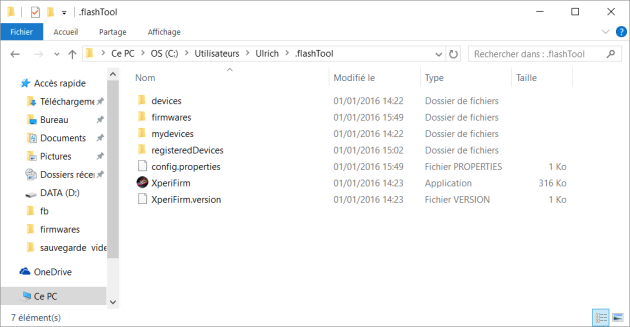
Step 2: Now download and move the D6503_23.5.A.0.570_R2D.ftf to the location of Flashtool as shown – “C:\Users\username.flashTool\firmwar
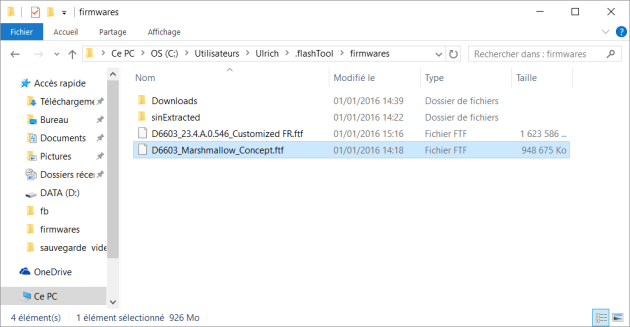
Step 3: Now open Flashtool and click on Flash device->Flashmode. The D6503_23.5.A.0.570_R2D.ftf should now appear on the list. Check Wipe APPS_LOG and USERDATA if you want to perform a clean install. If you are just looking forward to upgrade, then do not check the two options. Now select Flash and follow the instructions. If it asks to use a script, select No.
Step 4: Once installation completes, boot your phone normally and you should now be on the latest Marshmallow firmware. This process may take a while, so be patient.
That’s it. Enjoy your new Marshmallow firmware. Follow, like and share us on social media. For queries comment down below or leave a question in forums.