
Update: The Hosts Files have been updated with Crypto Mining blockers, and more filters for AdBlock Plus, AdAway, etc. Android has become the most popular mobile operating system. The OS has seen a continuous surge in the number of users since the beginning. The credit goes to FOSS business model. Being an open source operating system, development has surged in the past decade and there are various custom ROMS, mods, tweaks, and apps which provide for all our functionalities.
One of the most important reasons why so many Android users root their device is simply for blocking Advertisements. AdBlockers have become quite popular for both desktop and mobile browsers. The most popular way to block ads is by installing apps such as AdAway which edit the hosts.txt file present in system folder. However, AdAway requires root access.
There are several non-root applications such as Blockada or DNS66 which block trackers and Ads not only from browsers, but also from all the apps on your Android device. The only downside to this is that these apps setup a VPN connection and always run in the background making it heavy on battery life. An easier solution is to use the KNOX based Adhell 3 or SABS/notSABS applications to block ads and trackers natively; without any affect on the battery life.
No matter whichever method you are using, if you have access to the hosts.txt file, then you can easily tweak it to block domains and Ad networks. Hence, you may need some hosts file providers to edit the file and be safe. You can either copy the data from the providers and paste in your existing hosts file, or replace the file entirely keeping the same name.
However, make sure no data from original hosts TXT file is removed. You don’t need to delete existing data. Simply add the providers data at the bottom of the hosts file.
AdBlock Filters: List of popular Hosts Files
While AdAway hosts file will be sufficient for normal usage, you may still add data from the other providers listed below.
How to edit the Hosts.txt file on any Android device?
For your information, almost every Operating System including Windows, Linux, etc. has hosts.txt files. Same goes for the latest Android hosts.txt files. Now, for security reasons, the hosts.txt file is placed at the core of the system and is not accessible without root access.
Though there are ways you can access hosts file using ADB shell, but that may sometimes go wrong and mess up your Android system if you are not a developer.
If you have rooted Android phone, the the hosts file is easily accessible from /system/etc/hosts. If no file is present, you will have to input one there.
Here is how to edit the hosts TXT file on a rooted Android device:
- Download and install a root explorer such as ES File Explorer.
- Grant root access using Magisk Manager or SuperSU.
- Navigate to /system/etc or for some system, it could be /system/etc/hosts
- Locate the hosts.txt file.
- Copy the hosts TXT file to SD Card and later to PC.
- Use Notepad++ app to edit the hosts file.
- Open it in Notepad++ on PC and add the content from the custom hosts providers we have listed above and add data at the bottom of the hosts.txt file.
- If the original hosts file is empty, the simply replace it with the one listed above. You can merge multiple lists from above into one.
- Now, delete or replace the old hosts file from the /system/etc location on Android with the new one.
- Make sure you keep the name same as before.
- Long-press it, and go to select Properties.
- Give proper write Permissions. Basically give write permissions by checking box for Group under the Write column. Something like rw-r-r (0644) or more.
- Once done, reboot device.
How to subscribe to hosts providers on Adhell or SABS?
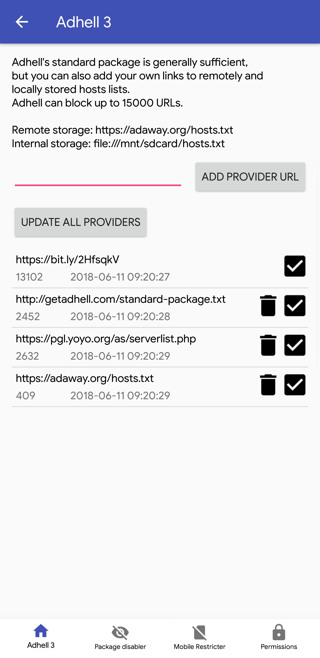
For Samsung users with Adhell 3 or SABS installed on their devices, there is an option to easily subscribe to hosts providers.
- Open up Adhell 3 or SABS or notSABS.
- Go to settings or more options tab on the top right corner.
- Search for Add Hosts Providers.
- Now, you can either download the hosts file to phone storage and provide the path or simply enter one of the above URLS from above to the Add Provider URL.
- You can also update the provider list whenever you want.
Note that, you will have to disable and re-enable KNOX based Ad Blockers on Samsung. Also, note that the more URLs the provider has, the longer it will take to enable Adhell or SABS. So keep the list to minimum.