
Steps To Unlock The Bootloader of Honor 8 and Honor 8 Pro
Users who like to mod and tweak their devices. Honor 8 Pro and its users are no exceptions to this. So, to resolve that query we bring you a step-by-step guide to unlock the Bootloader of Honor Pro 8.
Why Unlocking the device Bootloader is required?
- when you are rooting your device.
- installing custom ROMs.
- updating stock ROM manually.
- Unlocking the device bootloader will end your phone warranty, and it is irreversible.
- It will erase all your stored data on your device, so take a full backup of your data.
- AndroidSage won’t be responsible for any damage to your device.
To unlock the bootloader of Honor Pro 8 just follow these simple steps.
Step-1 First of all enable ‘USB debugging’ on your device.
To do that go to Settings> About Device>Tap the Build Number 7 times.
Now developer Option is unlocked. Now to unlock the OEM follow these steps.
Step-2 Install the ADB and fast boot driver for windows and then restart.
Step-3 Now follow this link and create a Huawei ID.
Step-4 After creating the ID, you will see a form.Fill out all the details on that form.
Step-5 It will ask for a product identification code, (to know that dial * # * # 1357946 # * # *) fill the code and submit.
Step-6 Now you will get the unlock code. We will use it later on.
Step-7 Now go to ADB and Fastboot installation directory.
Step-8 Open ADB folder and open the command window there by pressing and hold the ‘shift’ key and right-click anywhere in that folder.
Step-9 Now connect your phone to PC and reboot the device into fast boot mode by typing “adb reboot bootloader”.
Step-10 Type “fast boot devices” in command prompt and press Enter.
It gives you a serial number which means your device is connected properly.
Step-11 To unlock the bootloader, type “fastboot OEM unlock unlock key”. Here replace unlock key with the key you received in Step-6 earlier.
Step-12 Now it will unlock the Bootloader of Honor Pro 8.
Type “fastboot reboot” to restart the system.
Therefore, now you know how to unlock the Bootloader of Honor Pro 8. But be careful to follow the steps correctly, else your device will get hard brick.
Stay tuned with us for more tutorials and updates.
How To Install TWRP Recovery on Honor 8 and Honor 8 Pro?
In order to setup TWRP recovery on your Honor 8 and Honor 8 Pro or Lite, the first thing you need is the TWRP image files.
Download TWRP for Honor 8 variants
Latest TWRP recovery for Honor 8 | Download
TWRP recovery for Honor 8 Pro (DUK) | Download
TWRP recovery for Honor 8 Lite | Download | coming soon…
TWRP installation instructions:
Step-1 Start by enabling USB debugging mode. To enable it, go to
Settings > About Device > Build Number and tap the Build Number 7 times. Go through all the procedures in Unlocking tutorial.
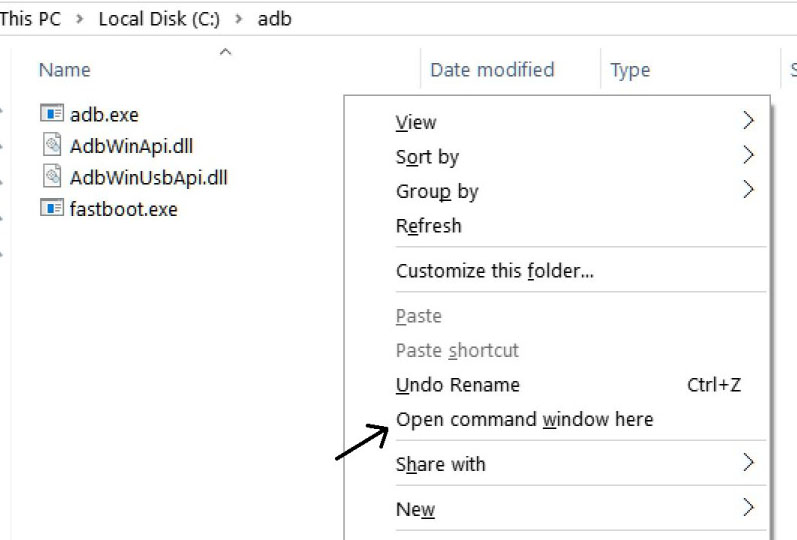
Step-2 Download and transfer the TWRP image into PC. Now go to TWRP IMG directory and run a command prompt window. Press and hold the ‘shift’ key and right- click anywhere in that folder. This will open the command prompt window.
Step-3 Now connect your phone to PC with USB cable.
Step-4 Next, reboot your device into fast-boot mode. To do this, type the following command in the command prompt
adb reboot bootloader
Then press Enter. Alternatively, you can do it by pressing and holding Volume down + Power Key.
Step-5 Your device is now in the Fastboot mode now to check your connection by entering following command in command prompt “fastboot devices”.
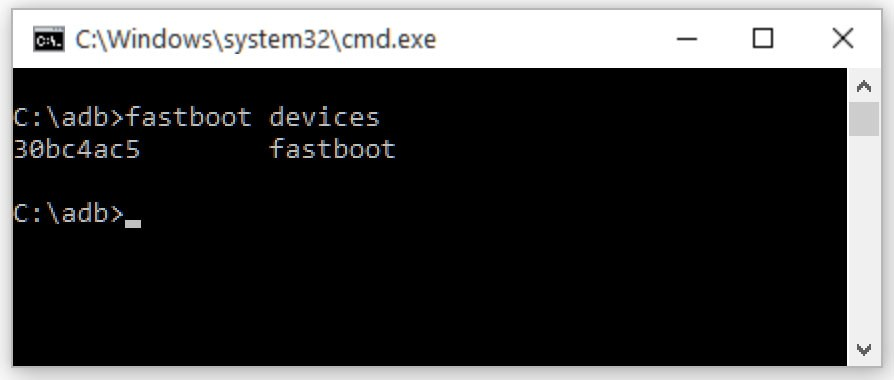
Check if your device is connected properly or not.
It will return your device serial number which denotes your device is properly connected.
Check your driver if the above command does not work.
Step-6 Now the most important step. Type the following command in command prompt.
fastboot flash recovery twrp.img
Write the exact name of the TWRP recovery image file. For example “twrp-3.1.1-1-duk.img” It will start flashing recovery on your phone.
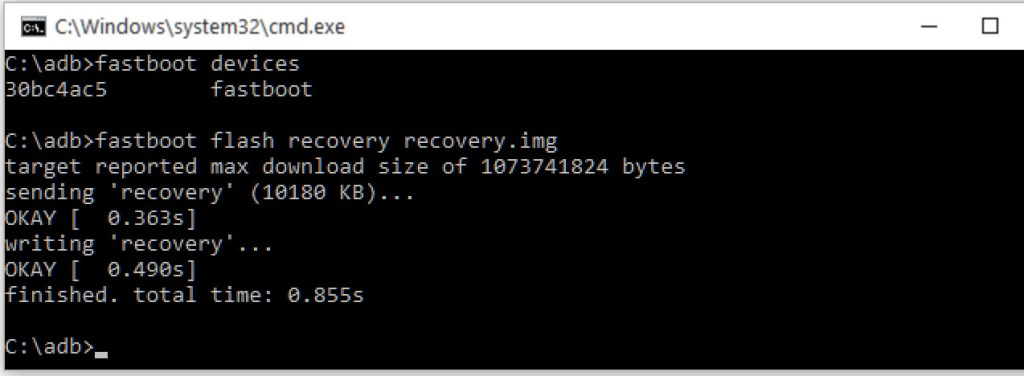
flash the recovery.img in command prompt to install the TWRP recovery in your Honor 8 Pro
Custom recovery is now installed on Honor 8 (Pro).
Step-7 Next disconnect your phone and boot into Recovery mode.
To do that press and hold the Volume Up + Power Key.
How to Root Honor 8 (Pro)?
Rooting is the last thing in this tutorial. Until now, we have procedure to unlock the bootloader, install TWRP recovery, and root the device. It’s time to root.
There are actually two methods to root and Huawei Android phone. Here are the following:
Flash latest SuperSU zip via TWRP
Flash latest Magisk Manager via TWRP
Both have their own advantages. Read it in the tutorials listed on the links.
Now that you know how to root and install TWRP Recovery on Honor 8 Pro device, you can modify your device and flash custom ROMS like Lineage OS 14.1. You can also flash stock updates manually