Close Menu

    Subscribe to Updates

    Get the latest creative news from FooBar about art, design and business.

    What's Hot

    Ai ghi nhiều hat-trick nhất lịch sử bóng đá? 

    April 29, 2026

    Bảng xếp hạng bóng đá La Liga mới nhất hôm nay

    April 29, 2026

    World Cup 2026 có bao nhiêu trận đấu? Toàn cảnh thể thức mới và số trận chính xác nhất

    April 28, 2026
    Facebook X (Twitter) Instagram
    WhatsApp
    Techy Hit Tools
    • Home
    • Tools
    • Write For Us
    Contact US
    Techy Hit Tools
    Home»HOW TO»Install Paranoid Android 7.2.0 Nougat ROM with support for more Android devices
    HOW TO

    Install Paranoid Android 7.2.0 Nougat ROM with support for more Android devices

    ManojBy ManojJune 25, 2024No Comments3 Mins Read
    Facebook Twitter Pinterest LinkedIn Tumblr Email
    Paranoid Android
    Share
    Facebook Twitter LinkedIn Pinterest Email

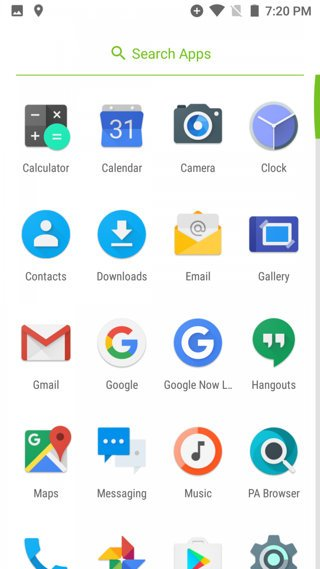
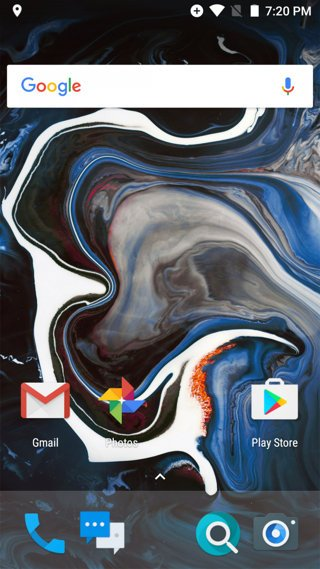
    Paranoid 7.2.0 Release 2 (AOSPA) is now being rolled out with support for more Android devices and added features. The first few smartphones to receive the same include OnePlus One, OnePlus X, Nexus 6, Xiaomi Mi5, Nextbit Robin, LeEco Le Pro3. This also includes the previous list for Paranoid Android 7.1.2 with phones like Google Pixel (XL), Nexus 6P, Nexus 5X, OnePlus 3, and OnePlus 3T. Oneplus 5 is still left out because the device is still new and the development has not yet started. Moreover, the developer has also shown promised builds for OnePlus 2 and Nexus 5 as well.

    Paranoid Android 2017 – Release 2 (7.2.0) is based on 7.1.2 Nougat and some back-ported changes from Android O preview. It consists of improvements to the color engine, Bluetooth and network connectivity optimizations, bug fixes. The best part about Paranoid Android is that it brings different optimizations exclusive to each Android phone. Whereas, for the Lineage OS 14.1, the sources are same for every Android phone. You can see the AOSPA full changelog from below.
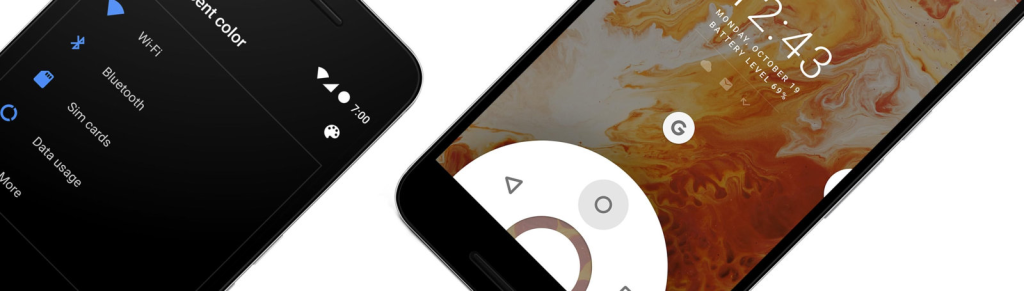
    What’s new with Paranoid Paranoid Android 2017 – Release 2 (7.2.0)?

    The new update brings the following changes over the previous:

    • Pocket Lock
    • Collaboration with the Shuttle+ player which will help you Google Cast to your TV, Embed lyrics, Batch creation of playlists, Themes, and much more.
    • Accidental Touch
    • Improvements to Color Engine

    Support for new devices:

    • bacon – OnePlus One
    • onyx – OnePlus X
    • gemini – Xiaomi Mi5
    • shamu – Nexus 6
    • Robin – Nextbit Robin
    • zl1 – LeEco Le Pro3

    Upcoming support includes OnePlus 2,Nexus 5 (Hammerhead), Sony Xperia line of devices like Xperia Z3 Compact and the Xperia X.

    Global Changes:

    Option for double tap to sleep on status bar
    Screen off action for button settings
    Fix for navigation bar swiping
    Notification light fixes and improvements
    Updated PA browser based on M60
    Pulse on pickup fixed
    Different fixes for contacts handling and integration into Google apps
    Various Bluetooth connectivity fixes
    Improvements for hardware key lighting
    Higher quality wallpapers
    Optimized fingerprint unlock speed
    Fixed reboot to recovery message
    Various performance enhancements
    Various power related enhancements
    Other fixes and improvements which will have to be discovered by you

    Check out the full changelog from here.

    How to Install Paranoid Android 2017 – Release 2 (7.2.0) build?

    Download AOSPA Paranoid Android 7.2.0 Nougat based ROM

    At the time of writing, the AOSP site was down. Hence, we were not able to update the download link at this moment. We will update it soon.

    • bacon – OnePlus One
    • onyx – OnePlus X
    • gemini – Xiaomi Mi5
    • shamu – Nexus 6
    • Robin – Nextbit Robin
    • zl1 – LeEco Le Pro3
    • Google Pixel
    • Google Pixel XL
    • Google Nexus 6P
    • Google Nexus 5X
    • OnePlus 3/3T

    Installation instructions:

    • Make sure your Android device has an unlocked bootloader.
    • Make sure your device is rooted with TWRP recovery installed.
    • (Optional) You may want to flash the AOSPA recommended TWRP from here.
    • Download and transfer the latest AOSPA firmware build from above to your phone storage.
    • You may also root via, latest SuperSU, or the Magisk Manager.
    • Download latest Gapps for 7.1.2 Nougat.
    • Transfer all the files onto into phone storage.
    • Reboot phone into TWRP recovery.
    • Take a full Nandroid backup of existing ROM.
    • Wipe the current partitions (system/data) except for the internal storage.
    • Tap on Install and flash the AOSPA ROM.
    • Similarly, flash Gapps and SuperSU/Magisk.
    • Reboot to system.
    Share. Facebook Twitter Pinterest LinkedIn Tumblr Email
    Manoj
    Manoj
    • Website

    Manoj, a tech enthusiast behind Techy Hit Tools, offers a comprehensive resource hub for tech aficionados. Dive into insightful guides, reviews, tutorials, and vibrant community support, ensuring you stay at the forefront of technology trends.

    Related Posts

    How To Set Microsoft Teams Status As Always Available

    September 24, 2024

    How Can You Screenshot OnlyFans Pictures

    September 24, 2024

    Can You See Text Messages on AT&T

    September 10, 2024
    Leave A Reply Cancel Reply

    Live Results Search
    Our Picks

    Ai ghi nhiều hat-trick nhất lịch sử bóng đá? 

    April 29, 2026

    Bảng xếp hạng bóng đá La Liga mới nhất hôm nay

    April 29, 2026

    World Cup 2026 có bao nhiêu trận đấu? Toàn cảnh thể thức mới và số trận chính xác nhất

    April 28, 2026

    Achraf Hakimi (Paris Saint-Germain) – A Star Who Redefined the Direction of Modern Football

    April 26, 2026

    Subscribe to Updates

    Get the latest creative news from SmartMag about art & design.

    About Us

    techy hit tools is a versatile platform that offers a comprehensive suite of over 30 free online tools designed to aid webmasters, students, teachers, and SEO experts.

    From content analysis to Backlink Maker, plagiarism checking to grammar correction, techy hit tools empowers users with a wide array of tools to enhance their online endeavors.

    Facebook Instagram Pinterest LinkedIn WhatsApp
    Our Picks

    Ai ghi nhiều hat-trick nhất lịch sử bóng đá? 

    April 29, 2026

    Bảng xếp hạng bóng đá La Liga mới nhất hôm nay

    April 29, 2026

    World Cup 2026 có bao nhiêu trận đấu? Toàn cảnh thể thức mới và số trận chính xác nhất

    April 28, 2026
    Contact US

      • Phone: +44 7950904740

      • Email: [email protected]

    HelpFull Links

    Here are some helpfull links for our user. hopefully you liked it.


            • สล็อต
            • สล็อต
            • สล็อตเว็บตรง
            • UFABET
            • สล็อต
            • เว็บสล็อต
            • เว็บสล็อต
            • สล็อตเว็บตรง
            • สล็อต
            • エクスネス ログイン
            • 123FAZ
            • สล็อต
            • UFABET เข้าสู่ระบบ
          • แทงบอล


    Copyright © 2026 Techy Hit Tools.
    • Home
    • About Us
    • Contact Us
    • Privacy Policy
    • Disclaimer
    • Terms of Use
    • Write For Us

    Type above and press Enter to search. Press Esc to cancel.

    WhatsApp us