Close Menu

    Subscribe to Updates

    Get the latest creative news from FooBar about art, design and business.

    What's Hot

    Zanzibar for nature lovers — what makes the island so captivating?

    August 21, 2026

    Baccarat Guide for Beginners: Learn Everything About This Classic Game

    August 19, 2026

    Web Design and SEO Services in Devon

    August 19, 2026
    Facebook X (Twitter) Instagram
    Techy Hit Tools
    • Home
    • Tools
    • Write For Us
    Contact US
    Techy Hit Tools
    Home»HOW TO»8 ways to enable Google Assistant on Android 5.1 Lollipop, 6.0 Marshmallow, and 7.0 Nougat or later
    HOW TO

    8 ways to enable Google Assistant on Android 5.1 Lollipop, 6.0 Marshmallow, and 7.0 Nougat or later

    ManojBy ManojJune 29, 2024No Comments3 Mins Read
    Facebook Twitter Pinterest LinkedIn Tumblr Email
    Google Assistant
    Share
    Facebook Twitter LinkedIn Pinterest Email

    It’s been a long time since the Google Assistant was introduced and we had posted several methods to enable it. It is currently officially only supported by Android devices running on 7.1 Nougat and 6.0.1 Marshmallow. However, there are still numerous smartphones running previous Android 5.1 Lollipop or KitKat. Google Assistant doesn’t officially support them. According to Android Developer Dashboard, phones updated to Lollipop firmware comprise of the highest number at 32% including Android 5.0 and Android 5.1.1. This is followed by 6.0.1 Marshmallow at 31.2%, Nougat at 7.1%, and finally KitKat at 18.8% as of May 2017. It’s a rather large number. Hence, we will show you how to enable Google Assistant on Android 5.1 Lollipop, Android 6.0.1 Marshmallow, and also on the latest 7.1.2 Nougat.

    The first section will take you to the proper tutorials on how to enable it without root or major customization. The first section is only for devices already on Android 6.0.1 or later. For Androids running Lollipop or below, can head over to the second section.

    Tips and tricks to enable Google Assistant on any Android device

    Best and tested way is to switch to a secondary Google Account on your Android phone to enable Google Assistant immediately.
    Sign up for the Google’s beta program for Play services and Google Play Store.
    Install a custom ROM based on latest Android 7.1.2 Nougat OS like Resurrection Remix 5.8.3+ or Lineage OS 14.1. For security concerns, you shouldn’t be using an outdated Android OS version anyway.
    Update your Android device to 6.0.1 Marshmallow or later officially from the manufacturer. If you don’t like custom ROMS, update it officially.
    Access Google Assistant using Google Allo app.
    Enable Google Assistant on your PC, Mac, or Linux machine via Web Browser.
    Check out this root method – how to enable the new assistant.
    If all the above procedures fail or your device is running Android 5.1 Lollipop OS or earlier, then head over to the the 8th method from below.

    How to setup Google Assistant on Android 5.1 Lollipop or earlier?

    This method requires Xposed module like Assistant Enabler. This only works up to Android 6.0.1 Marshmallow. Nougat or Oreo doesn’t support Xposed yet. Though the Xposed module says it’s for Marshmallow only, the module has been tested working on Android 5.1.1 Lollipop as well.

    • Make sure your Android phone is rooted with latest TWRP installed.
    • Install the latest Xposed Framework v87+ on your Android device.
    • Download Google Assistant Enabler Xposed module. (You can also search the module in Xposed app.)
    • Enable the Assistant Enabler module.
    • Reboot your device.
    • You can now long press the Home button or simply open the Google app and complete the onscreen instructions.
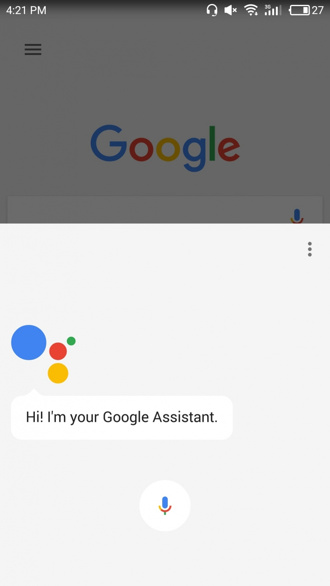
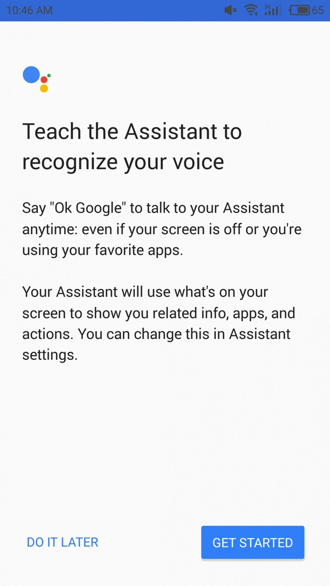
    If the assistant doesn’t show up, go through the tips and tricks to enable it. That’s it a new screen will show up asking to setup up Google Assistant on your Android phone. Simply say “OK Google” and start using the new personal assistant.

    Share. Facebook Twitter Pinterest LinkedIn Tumblr Email
    Manoj
    Manoj
    • Website

    Manoj, a tech enthusiast behind Techy Hit Tools, offers a comprehensive resource hub for tech aficionados. Dive into insightful guides, reviews, tutorials, and vibrant community support, ensuring you stay at the forefront of technology trends.

    Related Posts

    How To Set Microsoft Teams Status As Always Available

    September 24, 2024

    How Can You Screenshot OnlyFans Pictures

    September 24, 2024

    Can You See Text Messages on AT&T

    September 10, 2024
    Leave A Reply Cancel Reply

    Live Results Search
    Our Picks

    Zanzibar for nature lovers — what makes the island so captivating?

    August 21, 2026

    Baccarat Guide for Beginners: Learn Everything About This Classic Game

    August 19, 2026

    Web Design and SEO Services in Devon

    August 19, 2026

    GPA Tracking and Grading Calculations: What Students and Teachers Need to Know

    August 17, 2026

    Subscribe to Updates

    Get the latest creative news from SmartMag about art & design.

    About Us

    techy hit tools is a versatile platform that offers a comprehensive suite of over 30 free online tools designed to aid webmasters, students, teachers, and SEO experts.

    From content analysis to Backlink Maker, plagiarism checking to grammar correction, techy hit tools empowers users with a wide array of tools to enhance their online endeavors.

    | ทดลองเล่นสล็อต | สล็อตวอเลท | บาคาร่า | หวยลาว | หวยลาว | xoilactv | สล็อต | สล็อต | jav

    Facebook Instagram Pinterest LinkedIn WhatsApp
    Our Picks

    Zanzibar for nature lovers — what makes the island so captivating?

    August 21, 2026

    Baccarat Guide for Beginners: Learn Everything About This Classic Game

    August 19, 2026

    Web Design and SEO Services in Devon

    August 19, 2026
    Contact US

      • Phone: +92 348 1820262

      • Email: [email protected]

    HelpFull Links

    Here are some helpfull links for our user. hopefully you liked it.


                  • สล็อต
                  • สล็อต
                  • สล็อตเว็บตรง
                  • UFABET
                  • สล็อต
                  • เว็บสล็อต
                  • เว็บสล็อต
                  • สล็อตเว็บตรง
                  • สล็อต
                  • エクスネス ログイン
              • UFABET เข้าสู่ระบบ
        • แทงบอลโลก
    Copyright © 2026 Techy Hit Tools.
    • Home
    • About Us
    • Contact Us
    • Privacy Policy
    • Disclaimer
    • Terms of Use
    • Write For Us

    Type above and press Enter to search. Press Esc to cancel.

    WhatsApp us