

The latest flagship device Galaxy S8 from the Korean major Samsung was officially unveiled at an event in NYC last month. Undoubtedly, the Galaxy S8 came as a bliss to the Android Community with a ton of intriguing features. Today we are going to spread some light on the stunning bezel-less curved display. If you are familiar with the Always on display technology, you might have noticed that every smartphone manufacturer is trying to make it better and better considering each possible nitty gritty. Some of those include the latest flagships from the HTC, LG, Moto and Huawei. Similarly, the Galaxy S8 is loaded with an advanced version taking it to another level with the stunning infinity display. So, if you are already a fan of the Always on Display feature of the Galaxy S8 and wanna try it on your Samsung device, we have a good news for you. As the system dump for Galaxy S8 is now live, we have captured and extracted the latest-Always on Display APK from the S8. It is now available and you can grab the same from the links given below.
This is how the Always on Display feature looks exactly
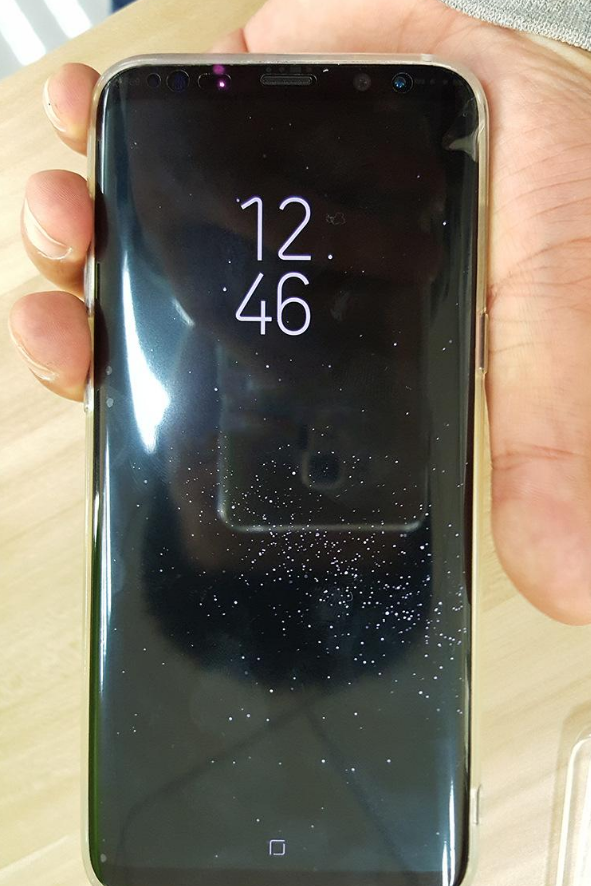
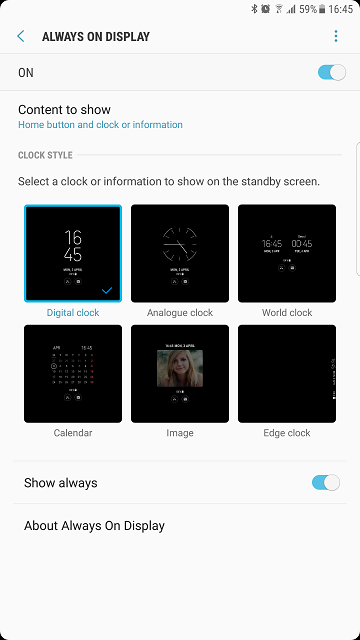
You get different clock styles or information to choose on the standby screen. You can either choose Digital clock, Analog clock or World clock. Moreover, you also get to manually choose what to display on your Always on Display. Be it, Calender, be it an image, set as per your convenience. Here’s a screenshot for your better understanding
Download Galaxy S8’s Always On Display APK for any Samsung device
The file weighs around 6.49MB and can be downloaded from the links given below
- Download|File: Always On Display 2.6.49
- Direct Link| File: Galaxy S8 Always on Display_
Some things to Know
In order to install the APK and enjoy the full functional Always on Display on your Samsung device, make sure you are running the Android version 7.0 Nougat or later. We have tested the same on Galaxy S7 edge & S6 edge, it worked perfectly fine for us. However, it may or may not work for everyone. To get proper notifications on the Always on Display, installing the latest Galaxy S8 Stock apps is recommended. Once you install the APK, there are few steps you need to do so that the app works properly. The Steps are given below
How to Install Galaxy S8’s Always On Display feature on any Samsung device?
As the file comes as an APK, so you can directly download and install the same on your device. But just installing the APK won’t work, so follow the given steps.
- Download and Install the file given above.
- Once the installation is done, the app will force close.
- Now you need to Clear the data so that the app works.
- To do so, go into application settings> Always on Display> Storage> Clear data.
- Now reboot your device once.
- You will see the Always on Display right there on your Standby screen. Ta Da!
For some reason, if you want to revert back you can simply uninstall the app or when connected in the USB Debug mode, use the following command
adb uninstall Galaxy S8 Always on Display_androidsage.apk
OR
adb uninstall com.samsung.android.app.aodservice
If you are someone who’s looking for a full Galaxy S8 experience on your S7 or lower device, head over to the tutorial that explains how to convert any Samsung device into Galaxy S8
Well, did you like it? What do you feel about the new Galaxy S8 Always on Display feature? Give it a try. Also, share your experience with us. If you face any issues while downloading and installing the same, reach out to us via the comments section below.