Close Menu

    Subscribe to Updates

    Get the latest creative news from FooBar about art, design and business.

    What's Hot

    VidMate vs Top Downloaders: 10 Reasons It’s the Ultimate Winner

    April 29, 2026

    Ai ghi nhiều hat-trick nhất lịch sử bóng đá? 

    April 29, 2026

    Bảng xếp hạng bóng đá La Liga mới nhất hôm nay

    April 29, 2026
    Facebook X (Twitter) Instagram
    WhatsApp
    Techy Hit Tools
    • Home
    • Tools
    • Write For Us
    Contact US
    Techy Hit Tools
    Home»HOW TO»How to recover lost files on Android device? [Images, Contacts, Messages, Documents]
    HOW TO

    How to recover lost files on Android device? [Images, Contacts, Messages, Documents]

    ManojBy ManojJuly 4, 2024No Comments2 Mins Read
    Facebook Twitter Pinterest LinkedIn Tumblr Email
    Android device
    Share
    Facebook Twitter LinkedIn Pinterest Email

    Mobile technology is advancing and the apps are getting simpler by the day. It has become very easy to access data and even lose it. Moreover, sometimes the user can also mistakenly delete some files he is not supposed to. This is where the EaseUS MobiSaver comes into action. The software scans the entire Android system and tries to recover as much data as possible including contacts, SMS, photos and even lost videos. Android system creates temporary cache while it functions. The EaseUS software makes use of it and also recovers possible data and files situated deep within the system. Hence, it requires root access.

    Data loss can happen due to multiple reasons including factory reset, OS failure, accidental deletion of files, corrupt apps, malware injection, and much more. Even though there are several cloud services including Google’s very own Synchronization technology, it can’t restore everything.

    The EaseUS MobiSaver for Android comes to us completely free and is very simple to use. It can support most of the Android phones from manufacturers like OnePlus, HTC, LG, ZTE, Huawei, Samsung, Google (Nexus), Sony, Motorola, and more. It has been updated to work for most of the Android versions up to Android 7.1.1 Nougat.
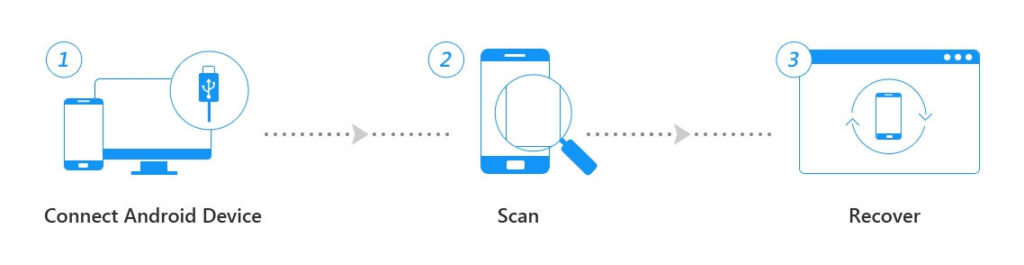
    How to restore deleted photos, contacts, SMS, documents on Android?

    • Make sure you have a rooted Android device.
    • Download the EaseUS MobiSaver software to PC. Direct download link.
    • Run the application as administrator.
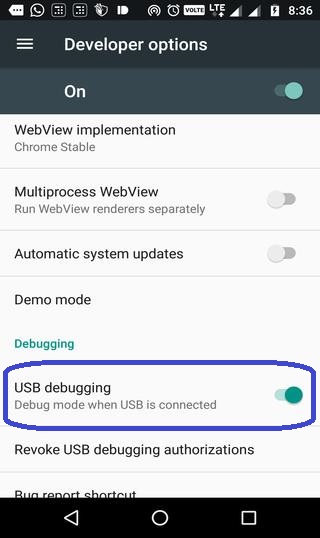
    • Enable USB debugging from Developer Options on your Android device. Enable Developer Options by hitting the Settings>About Phone>Build number multiple times.
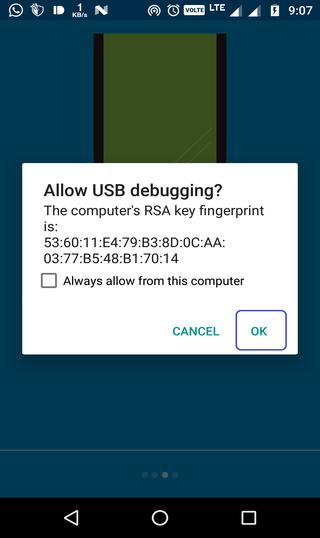
    • Connect the Android to PC. Trust the USB debugging connection on phone screen when you connect the device for the first time.
    • EaseUS will automatically detect the device and highlight it on the home screen.
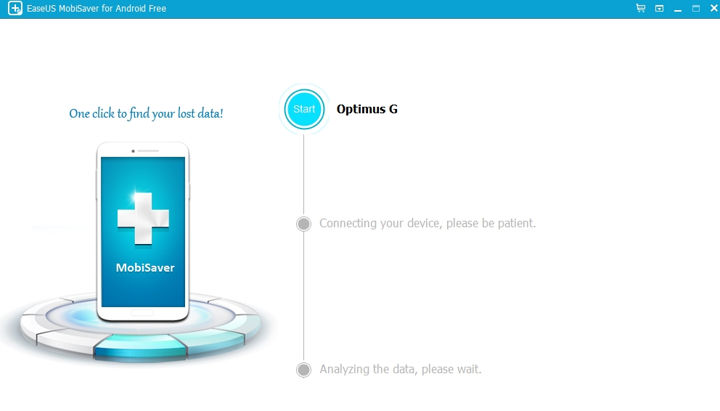
    • Click on the Start option. Once the app detects root access on phone, it will immediately start the recovery process.
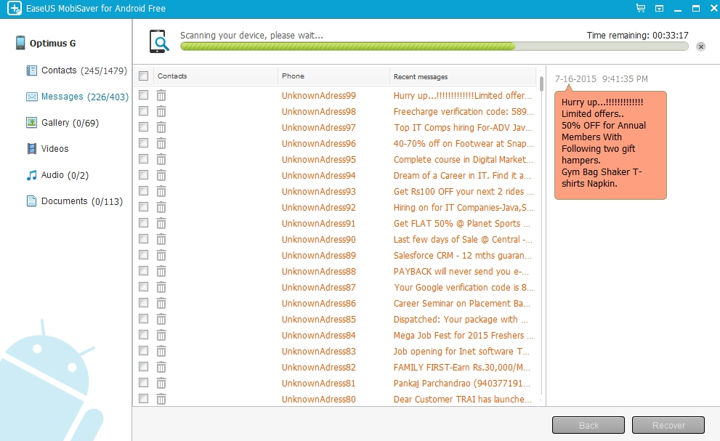
    Click on the Start option. Once the app detects root access on phone, it will immediately start the recovery process.
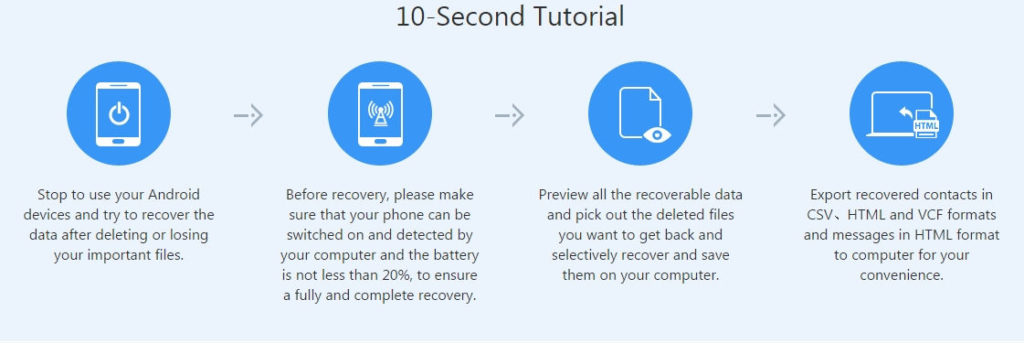
    That’s it. Once the process touches 100 percent, you can view and restore the files immediately into the device.

    Share. Facebook Twitter Pinterest LinkedIn Tumblr Email
    Manoj
    Manoj
    • Website

    Manoj, a tech enthusiast behind Techy Hit Tools, offers a comprehensive resource hub for tech aficionados. Dive into insightful guides, reviews, tutorials, and vibrant community support, ensuring you stay at the forefront of technology trends.

    Related Posts

    How To Set Microsoft Teams Status As Always Available

    September 24, 2024

    How Can You Screenshot OnlyFans Pictures

    September 24, 2024

    Can You See Text Messages on AT&T

    September 10, 2024
    Leave A Reply Cancel Reply

    Live Results Search
    Our Picks

    VidMate vs Top Downloaders: 10 Reasons It’s the Ultimate Winner

    April 29, 2026

    Ai ghi nhiều hat-trick nhất lịch sử bóng đá? 

    April 29, 2026

    Bảng xếp hạng bóng đá La Liga mới nhất hôm nay

    April 29, 2026

    World Cup 2026 có bao nhiêu trận đấu? Toàn cảnh thể thức mới và số trận chính xác nhất

    April 28, 2026

    Subscribe to Updates

    Get the latest creative news from SmartMag about art & design.

    About Us

    techy hit tools is a versatile platform that offers a comprehensive suite of over 30 free online tools designed to aid webmasters, students, teachers, and SEO experts.

    From content analysis to Backlink Maker, plagiarism checking to grammar correction, techy hit tools empowers users with a wide array of tools to enhance their online endeavors.

    Facebook Instagram Pinterest LinkedIn WhatsApp
    Our Picks

    VidMate vs Top Downloaders: 10 Reasons It’s the Ultimate Winner

    April 29, 2026

    Ai ghi nhiều hat-trick nhất lịch sử bóng đá? 

    April 29, 2026

    Bảng xếp hạng bóng đá La Liga mới nhất hôm nay

    April 29, 2026
    Contact US

      • Phone: +44 7950904740

      • Email: [email protected]

    HelpFull Links

    Here are some helpfull links for our user. hopefully you liked it.


            • สล็อต
            • สล็อต
            • สล็อตเว็บตรง
            • UFABET
            • สล็อต
            • เว็บสล็อต
            • เว็บสล็อต
            • สล็อตเว็บตรง
            • สล็อต
            • エクスネス ログイン
            • 123FAZ
            • สล็อต
            • UFABET เข้าสู่ระบบ
          • แทงบอล


    Copyright © 2026 Techy Hit Tools.
    • Home
    • About Us
    • Contact Us
    • Privacy Policy
    • Disclaimer
    • Terms of Use
    • Write For Us

    Type above and press Enter to search. Press Esc to cancel.

    WhatsApp us