
The CyanogenMod Inc. development team has come with a surprise today with its new project called the CyanogenMod 14.1. Amid several unofficial CM 14.1 ROM builds, the Cyanogen team has now launched the official stable CM 14.1 ROM for various Android devices. The CM 14.1 ROM is based on the latest Android 7.1 Nougat firmware. Moreover, the first Android phones to receive the official builds are the two Nexus 6P & 5X, OnePlus 3, Moto G variants and some popular devices from Samsung, Asus, LG, Xiaomi, etc.
Now, being a very first build from CM, you may still find some bugs or instability issues. Moreover, some features usually expected in the CyanogenMods ROMS like CM theme engine, advanced configuration options, etc. can be missing right now. However, as it is official, you will get daily or weekly updates for your device with more features each time. Soon you will find CM 14.1 compatible themes and much more on the Play Store. The CyanogenMod 14.1 is indeed based on the latest AOSP security update from November and October 2016. As the ROM comes with latest Android 7.1 Nougat firmware, you can install or port most of the Google Pixel apps and features onto your Android device.
We have listed some screenshots and the full list of devices receiving the CM 14.1 right now. So hit the download section below and grab the latest build for your Android. The installation instructions are listed below.
Official CM 14.1 screenshots and features:
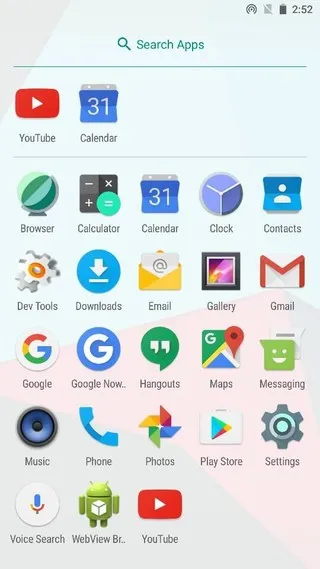
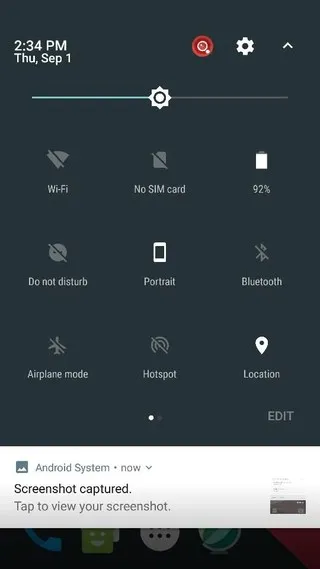
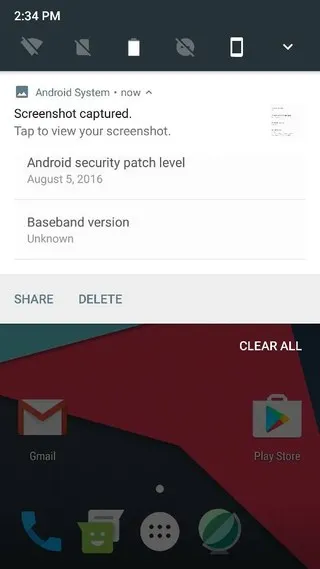
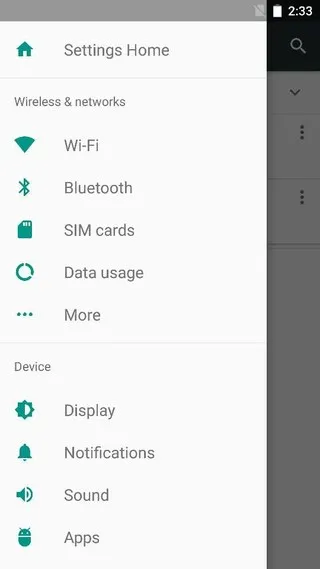
List of devices receiving the latest official CyanogenMod 14.1 based on Android 7.1 Nougat
- angler (Nexus 6P)
- bullhead (Nexus 5X)
- cancro (Xiaomi Mi3w/Mi4)
- d855 (LG G3)
- falcon/peregrine/thea/titan (Moto G variants)
- h811/h815 (LG G4)
- klte/kltedv/kltespr/klteusc/kltevzw (Samsung Galaxy S5)
- oneplus3 (OnePlus 3)
- Z00L/Z00T (Zenphone 2)
Download official CyangenMod 14 for your Android
- Amazon Kindle Fire HDX 7, third gen (thor)
- Amazon Kindle Fire HDX 8.9, third gen (apollo)
- ARK Benefit A3 (peach)
- Asus Z00L/Z00T (Zenphone 2)
- Barnes & Noble – acclaim Nook Tablet
- Cancro (Xiaomi Mi3w/Mi4)
- HTC One A9 (GSM US)
- LG G3 d855 (LG G3)
- LG G3 Beat jagnm
- LG G3 S jag3gds
- LG G4 h811 LG G4
- LG G4 h815 (LG G4)
- Moto G falcon
- Moto G 4G peregrine
- Moto G 2014 titan
- Moto G 4G 2014 thea
- Nexus 6P angler (Nexus 6P)
- Nexus 5X bullhead (Nexus 5X)
- Nexus 7 2013 (Wi-Fi)
- Nexus 7 2013 (4G)
- Nexus 5
- OnePlus One
- Oneplus 2
- oneplus3 (OnePlus 3)
- OnePlus X (onyx)
- OPPO Find7s
- OPPO find7
- Samsung Galaxy S5 klte/kltedv/kltespr/klteusc/kltevzw
- Samsung Galaxy S III (Intl)
- Sony Xperia V
- Sony Xperia T
- Sony Xperia SP
- Sony Xperia TX
- Samsung Galaxy S III, Sprint model (d2spr)
- Motorola Moto E 2015 (otus)
- Motorola Moto E original (condor)
- Motorola Moto G4 and G4 Plus (athene)
- Moto X Pure (2015)
- Xiaomi Mi5 (gemini)
- Xiaomi Redmi 2 (wt88047)
- Xiaomi Mi Max hydrogen
- Xiaomi Redmi 3/Prime ido
- More CM 14.1 builds
Files to Install CM 14.1 ROM on your Android
Download CM 14.1 compatible Gapps package (Google Apps)
CyanogenMod 14.1 ROMS need you to install Google apps separately. Gapps don’t come pre-installed on it. Hence, you will need to flash the gapps package externally. Simply download the gapps from above and follow the instructions below.
- Android 7.1 Nougat CyanogenMod 14.1 compatible Google Apps
- → Gapps for CM 14.1 → Download Link | use arm64, arm package
Download the latest TWRP 3.0.2+ for all Android devices
How to Install Android 7.1 Nougat CyanogenMod 14 ROM on your Android device?
Requirements
- Unlocked Bootloader is required most commonly for custom TWRP recovery installation. If you have a custom recovery
installed, then you can flash the ROMS right away. - Make sure you have a custom recovery installed on your device. Latest build from TWRP is highly recommended. Get the TWRP from the download section and get here to know how to flash it.
- Make sure you have latest device drivers setup on your PC in order to transfer the files to your device’s internal storage. Get it from the official page of your device manufacturer.
Installation Instructions for official CM 14.1 Nougat
Here is are brief instructions to install custom ROM via TWRP. For a full tutorial, go to How to Install Custom ROM using TWRP?
Step 1: Download the official CM 14.1 ROM and the compatible Google Apps from above. For root access, download the SuperSU file from above.
Step 2:Transfer all the necessary files to your device’s internal storage or SDcard.
Step 3: Reboot into TWRP recovery. Power off completely and then press and hold the power button and volume down key for a few seconds.
Step 3: Take full Nandroid backup: Backup partitions- system, data, boot, recovery, EFS and cache(optional).
Step 4: Wipe the current system.
Step 5: Tap Install, navigate to the CM 14.1 ROM zip file and select it. Confirm action.
Step 6: Similarly, flash the compatible Google apps and SuperSU zip files.
Step 7: Reboot to system.
How to Root official CyanogenMod 14.1 running Android 7.1 Nougat with latest SuperSU?
You can simply allow root access from Developer Options. If that doesn’t work then follow our successful tutorial on how to root most of the Android devices running Android 7.1 Nougat. Checkout: 3 ways to root Android device running Android 7.0 Nougat or later. The tutorial has 3 methods listed. Use te one that best suits your device.
The latest SuperSU version 2.78 R3 has been confirmed working with the CM 14 or later. The new SuperSU build should root the official CM 14.1 ROM. You should also flash the latest TWRP version to bypass forced encryption issues. Downloads below.
Flash SuperUser for Root Access on CyanogenMod 14.1
→ SuperSU v2.78+ → Download Link
Install Xposed Framework on CyanogenMod 14.1
The Xposed framework is being updated to work on latest Android 7.0 Nougat or later. Meanwhile, you can check out a short tutorial and downloads for latest Xposed. Simply download the Xposed installer and flash the package via TWRP.