

The aspiring manufacturer – Zopo Mobile has been updating some of its premium smartphones with the latest Android 6.0 Marshmallow firmware. The devices that support the Marshmallow update include the Speed 7 series phones like Speed 7C, 7GP Speed 7 Plus as well as the latest Zopo Speed 8. The updates come officially from the manufacturer and can be termed as stable. The new ROM brings the latest Marshmallow goodies like the Google Now on Tap, App permissions, Doze mode, Fingerprint standardization, etc. As for the firmware upgrade, the stock ROM has been improved for battery performance, stability, and has been compiled with a newer AOSP source. As compared to the Android 5.0 Lollipop firmware for the Speed 7 devices that brought new user interface and functions, the Android 6.0 does not show any significant change as the ROM is pretty stable in itself. So grab the full firmware update for your Zopo Speed 7 and 8 devices and follow the instructions from below. UPDATE: Xopo now updates the full Speed and Color series devices with the latest Android 6.0 Marshmallow firmware. The Android update comes to phones like Speed 7, Speed 7 C, Speed 7 GP, Speed 7 Plus, Speed 8, Color C (ZP330), Color E (ZP350) and Color S5.5 (ZP370).
Download Zopo Speed 7, 7C, 7GP, 7 Plus and Speed 8 Android 6.0 Marshmallow Update
Marshmallow For Zopo Color Series
- Zopo Color C (ZP330) → Download | File: S5580C 20160509-174434 m.zip
- Zopo Color E (ZP350 → Download | File: S5586C 20160225-142144 lp1.zip
- Zopo Speed Color S5.5 (ZP370) → Download | File: S5570A 20160509-151921 m.zip
- Zopo Color F5 → Download | File: S5570C 20160509-152802 m.zip
- Color F2
Marshmallow For Zopo Speed 8
- Zopo Speed 8 → Download | File: S5590C 20160527-120114 m.zip
Marshmallow For Zopo Speed Series
- Zopo Speed 7 → Download | File: S5580C 20160509-174434 m.zip
- Zopo Speed 7C → Download | File: S5586C 20160225-142144 lp1.zip
- Zopo Speed 7GP → Download | File: S5570A 20160509-151921 m.zip
- Zopo Speed 7 Plus → Download | File: S5570C 20160509-152802 m.zip
Download SP Flash Tool For Zopo: Support MT67xx / 65xx & Drivers
- Latest SP Flash Tool v5.1616 for Windows
- Latest SP Flash Tool v5.1616 for Linux
Download Zopo Mobile Drivers
- Driver_Auto_Installer_v5.1524.03.exe
The files listed above are not OTA updates. These are full firmware files. Hence, need to be flashed manually via a dedicated SP Flash Tool for Zopo.
How to Update Zopo Devices to Stock Android 6.0.1 Marshmallow Firmware? Zopo Speed and Color series
Prerequisites
- Enable USB Debugging on your device. To do so, go to Settings>About Phone> Tap on the Build Number several times until you get a new Developer Options in theSettings. Open Developer Options and enable USB Debugging from there. Trust the connection by allowing it when you connect it to your PC for the first time.
- For ADB and Fastboot download the quick ADB and Fastboot Installer from here for Windows or use this tool for iOS, Linux, Chrome OS, Windows. You may also like Koush’s Universal ADB Driver.
Installation Instructions:
Step 1: Download the firmware, SP Flash Tool and drivers. Install the SP Flash Tool and drivers.
Step 2: Disconnect your device from PC and turn it off.
Step 3. Extract the SP Tool archive.
Step 4: Double-click on flash-tool.exe to open the application. (Run as Admin)
Step 5. Now click on Open/Browse and the add the firmware file.
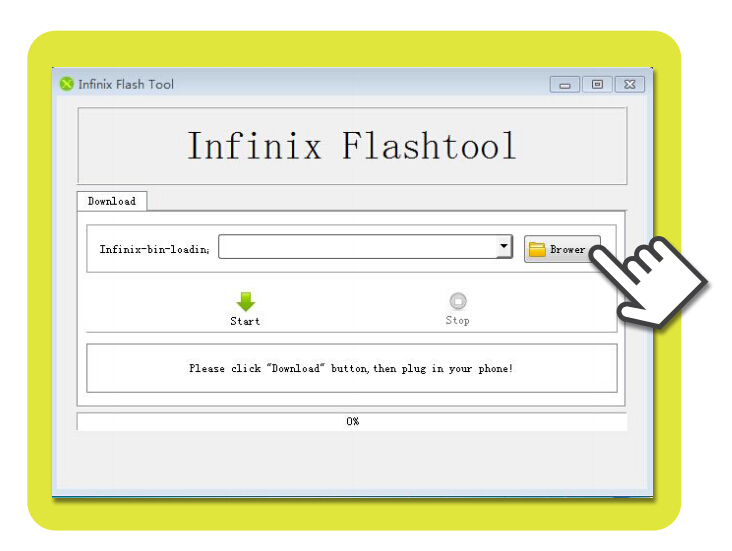
Step 6. After the software has finished loading.
Step 7: Keep the phone off and connect the USB and let the download complete. (You may want to boot your device to download mode or recovery mode if it doesn’t work.)
Step 8: Click the Download button.