
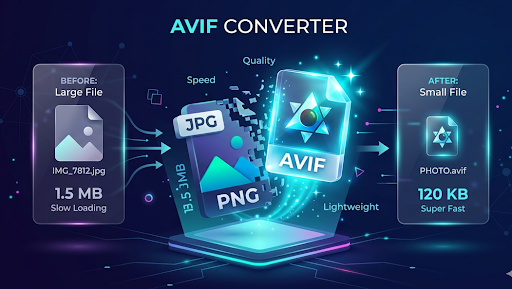
In the modern digital world, speed is everything. If a website takes more than a few seconds to load, visitors usually leave. One of the biggest reasons for a slow website is heavy images. This is where an Image to AVIF Converter comes in. In this long-form guide, we will explore everything about the AVIF format, why it is better than JPEG or PNG, and how you can use it to make your website fly.
What Exactly is an AVIF Image?
To understand why you need an Image to AVIF Converter, we first need to understand what AVIF is. AVIF stands for AV1 Image File Format. It is a new type of file that makes pictures very small in size without making them look bad.
Think of a heavy suitcase. If you have a magic machine that can shrink that suitcase to the size of a matchbox without losing anything inside, that is exactly what AVIF does for your digital photos. It uses a special kind of “compression” technology that was originally built for high-quality video. Now, we use that same power for images on the web.
Is AVIF Better Than JPEG?
Yes, absolutely. JPEG has been around for over 30 years. While it was great back then, it is now outdated. AVIF is much smarter. It can handle more colors and sharper details while staying much “lighter” than a JPEG.
Why Speed Matters for Your Website
Before we dive deeper into the tool, let’s talk about why you should care about image size.
1. Happy Visitors
Imagine you are trying to read a story online, but the pictures keep loading slowly. It’s frustrating! When you use an Image to AVIF Converter, your pages load instantly. This makes your visitors happy, and happy visitors stay longer on your site.
2. Google Rankings (SEO)
Google is like a teacher who gives high marks to students who are organized and fast. Google has something called “Core Web Vitals.” This is a fancy way of saying they check how fast your website loads. If your images are converted to AVIF, your website becomes fast, and Google will show your site to more people.
3. Saving Money on Data
Many people use the internet on their phones. If your images are huge, they eat up the user’s mobile data. By using AVIF, you are being kind to your users by saving their data and their battery life.
How Does the Image to AVIF Converter Work?
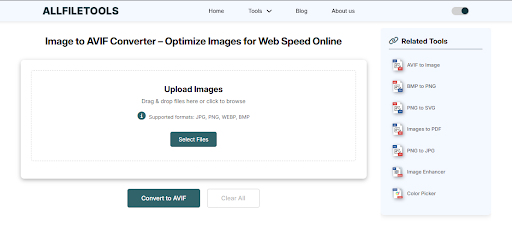
You might think that changing an image format is complicated, but our tool makes it as easy as clicking a button. Here is the simple process:
Step 1: Open your web browser and go to the trusted AllFileTools.com website. Use this Tool Image to AVIF Converter
Step 2: Click the “Select Images” or “Upload” button to pick the JPG or PNG files from your device.
Step 3: Select “AVIF” as your target output format to ensure the best compression.
Step 4: Click the “Convert” button and wait a few seconds while the tool makes your image lighter.
Step 5: Click the “Download” button to save your new, fast-loading AVIF file to your computer or phone.
AVIF vs. PNG: The Battle of Quality
Many people use PNG because it allows for “transparency” (where you can see through the background). However, PNG files are very, very heavy.
The good news is that AVIF also supports transparency. This means you can take your heavy PNG logos and icons, run them through an Image to AVIF Converter, and get the exact same look but with a much faster loading speed.
Why AVIF is the Future of the Web
Technology is always moving forward. Just like we moved from bulky TVs to flat screens, the internet is moving from old image formats to AVIF.
1. Better Colors
AVIF supports something called “High Dynamic Range” (HDR). This means the bright parts of your photo look brighter, and the dark parts look deeper. It makes your website look professional and modern.
2. No More “Banding”
Have you ever seen a picture of a sunset where the sky looks like it has stripes or “steps” of color? That is called banding. AVIF is so smart that it smooths out those colors, making your sky look like a real-life sunset.
3. Efficiency
Because AVIF is so efficient, it helps the environment too. Smaller files mean less work for the giant computers (servers) that run the internet. Less work means less electricity used!
Who Should Use an Image to AVIF Converter?
This tool is not just for tech experts. It is for everyone who owns a piece of the internet:
For Bloggers
If you write travel or food blogs, you need many photos. Using AVIF ensures your blog doesn’t crash on mobile phones.
For Small Business Owners
If you have a website for your shop, speed equals sales. A fast site makes you look trustworthy.
For Students
If you are making an online portfolio or a school project, using modern formats like AVIF shows that you know your stuff and are up-to-date with technology.
Step-by-Step: Best Settings for Conversion
When you use an Image to AVIF Converter, you might see some options. Here is how to pick the best ones:
- Quality Level: Usually, a setting between 60 and 80 is perfect. It makes the file tiny while keeping the image looking great to the human eye.
- Speed: You can choose how hard the tool works. “Medium” speed is usually the best balance for most users.
- Keep Metadata: If you want to keep the “hidden” info (like the date the photo was taken), make sure this is checked. If you want the smallest file possible, uncheck it.
Why Our Tool is the Best Choice
There are many converters out there, but our Image to AVIF Converter is built for humans.
- Privacy First: We don’t store your photos. Once you convert and download, your original file is deleted from our system.
- No Watermarks: We don’t put any ugly logos on your photos. They belong to you.
- Unlimited Use: You can convert as many photos as you want, every single day.
- Mobile Friendly: You can use our tool on your iPhone, Android, or laptop without any issues.
Real World Results: A Case Study
Let’s look at a real example of why this matters.
A small online store had 50 product images in JPEG format. Their page size was 10 MB. This meant it took about 5 seconds to load on a 4G connection.
They used our Image to AVIF Converter to change all 50 images. The total page size dropped from 10 MB down to just 2.5 MB.
The result? The page loaded in less than 2 seconds. Because the site was faster, more people clicked “Add to Cart,” and the store’s sales went up by 15% in one month!
Summary: Your Path to a Faster Web
To wrap everything up, here is what we learned today:
- AVIF is the king of image formats. It is smaller than JPEG and better than PNG.
- Speed is vital. Fast websites get more visitors and more love from Google.
- Conversion is easy. You don’t need to be an expert to use our tool.
- Everyone benefits. From bloggers to shoppers, everyone likes a fast-loading internet experience.
Final Thoughts
Don’t let old technology hold your website back. The world is moving toward a faster, cleaner, and more efficient internet. By using an Image to AVIF Converter, you are taking a big step toward making your digital presence the best it can be.
Ready to see the difference? Upload your first image now and see how much space you can save!
🔹 Explore more powerful file conversion and online utilities at AllFileTools –
🔹 For technical support, digital solutions, and expert services, visit LetDigitalFly IT Services –
🔹 Discover additional career and productivity resources at Resume Slip Builder –
Frequently Asked Questions (FAQ)
Can I convert multiple images at once?
Yes! Our tool allows you to upload several photos and convert them all to AVIF at the same time to save you time.
Will AVIF work on social media?
Many platforms like WordPress and various websites support AVIF. Some social media sites still prefer JPEG, so it is always good to keep a copy of your original just in case.
Does AVIF support animation?
Yes! Just like a GIF, AVIF can actually hold short animations, but with much better quality and smaller sizes.
Is it safe for my privacy?
Absolutely. Our tool processes your images and then wipes them from our servers immediately. Your data stays yours.
