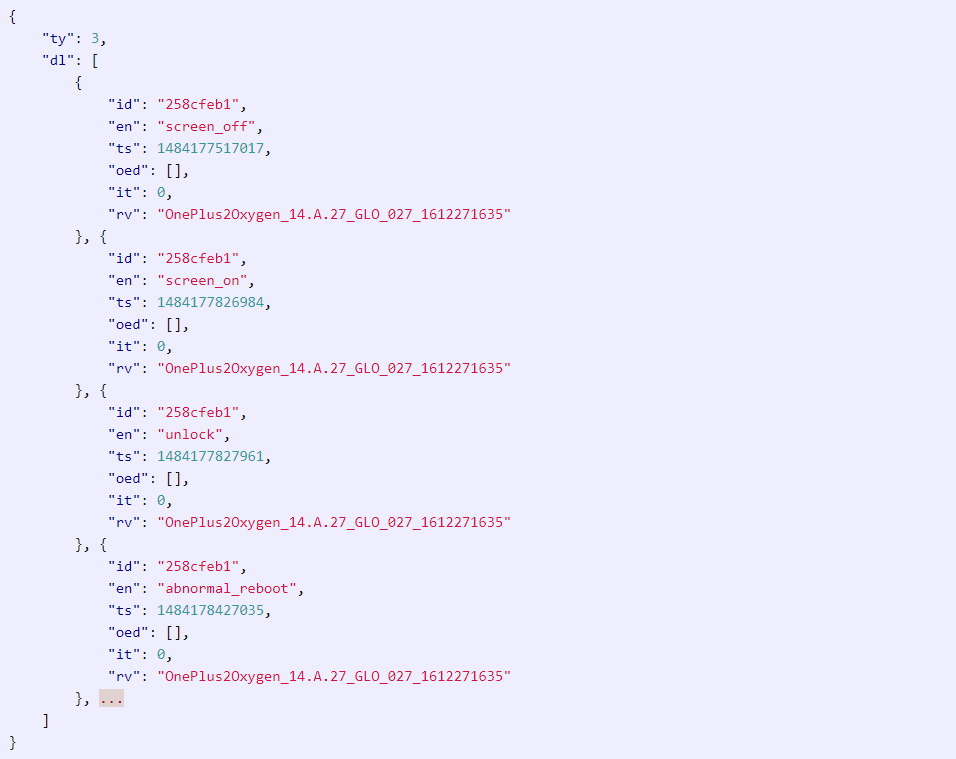
OnePlus has been reported collection analytics data without the knowledge of its customers. The stock firmware on OnePlus devices, called Oxygen OS, is now accused of collecting immense amount of data from user devices associated with their personal information like phone numbers, IMEI, WiFi info, and even app activities. Although, analytical data is used by several developers and manufacturers, they collect it anonymously. Upon taking a look into what the OnePlus also record timestamps of when an app is open and close, when the screen is locked and unlocked.
According to Christopher Moore, a software engineer, who first showcased the Oxygen OS built-in analytics data collection, revealed a shocking amount of data sent was sent to OnePlus domains. In 10 hours the OPDeviceManager app and its services sent a whopping 16 MB of data. Which is a lot of data when the format is just texts and timestamps. Upon further inspection, he found that the services called a domain open.oneplus.net hosted on Amazon AWS instance owned by the manufacturer. Though the server is secure and sends data over HTTPS, it is still against user privacy policy.
What is wrong with OnePlus Oxygen OS built-in analytics?
Firstly, although most of the manufacturers collect analytical data, it either gives you the option to sign up for it or simply prompts when you first start using their products. However, the fact that none of the OnePlus users were actually aware of the program raises questions. The analytics program are based at system root. Also, the options to disable them are quite hidden and enabled by default. In fact, the Oxygen OS software does not even prompt at first boot.
Secondly, even Google collect analytics data on most of their products. Be it Chrome browser, Google Play services, or even Android system. However, the analytics program is prompts at first boot or when you first sign up for Google services. This isn’t the case with OnePlus.
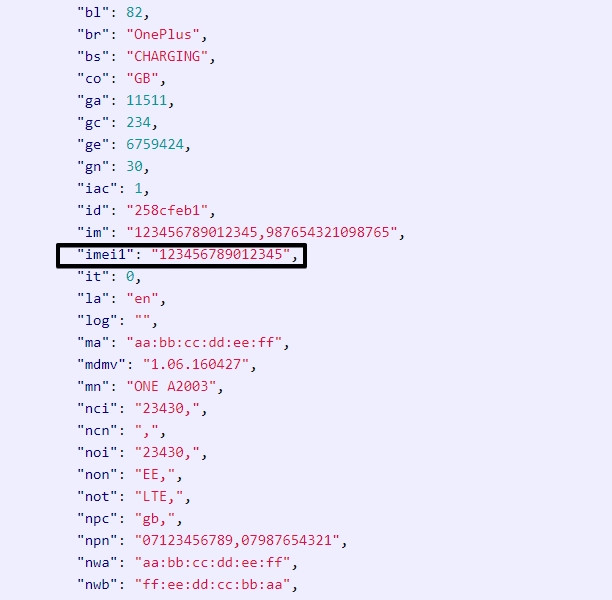
Last but not the least, Google collects data anonymously. OnePlus data collection isn’t anonymous. Anonymous means, the data can’t be used to track customers or users account. It keeps the privacy intact. This does not happen with Oxygen OS. The manufacturer data collects and records IMEI, MAC addresses, IP address, phone numbers ,and much more.
What is the data associated with the OnePlus analytics program?
It calls upon the following user information:
- Phone number
- Phone’s IMEI number
- MAC addresses
- IMSI prefixes
- Mobile network names
- Wireless network ESSID and BSSID
- Device serial number
- Records of each activity including when an app opens and closes
- Timestamp of locking and unlocking the device
- Screen off Timestamp
So if you are worried about your privacy, then here is a complete guide to remove all the OnePlus data analytics and data mining programs.
Now remember, you will want to go through the procedures again after an OTA update.
Method 1 Non-root: How to disable OnePlus analytics data collection?
1) After several news websites reporting the issue to the public, the manufacturer breaks silence. After questioning as to why the data is being collected, the software development team responded with this:
We securely transmit analytics in two different streams over HTTPS to an Amazon server. The first stream is usage analytics, which we collect in order for us to more precisely fine tune our software according to user behavior. This transmission of usage activity can be turned off by navigating to ‘Settings’ -> ‘Advanced’ -> ‘Join user experience program’. The second stream is device information, which we collect to provide better after-sales support.
- Go to settings app.
- Enter Advanced settings tab.
- Disable “Join user experience program”
However, this does not completely solve the issue. It still sends some of the analytics data to the OnePlus servers. This does not justify the large amount of data sent to them along with the personal information.
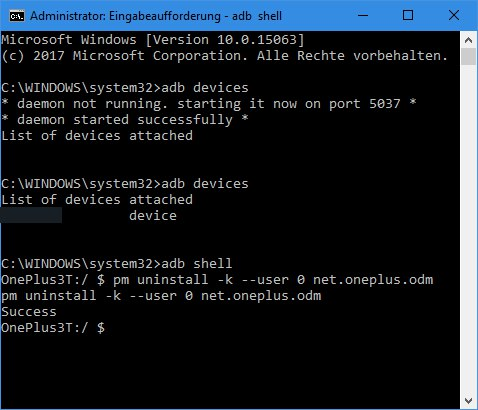
2) As for the complete privacy, there is another method to disable it via ADB shell. All you need to do is connect your OnePlus 3 device to PC and issue the following code via ADB shell.
- Makes sure you have setup ADB on PC.
- Makes sure USB debugging is enabled on OnePlus device.
- Open a command prompt or terminal as administrator.
- Connect device to PC via USB cable.
- Enter shell by typing “adb shell”
- Later issue the following command:
Method 2 Root: How to completely remove OnePlus Oxygen OS built-in analytics?
If you aren’t satisfied with the non-root methods and want permanent measures, then you can take extra measures to completely banish the OnePlus analytics tracking.
1) As soon as the news got out, developers and contributors started working on various platforms to bring this snooping to end. This brings us to one specific but important Magisk module OnePlus Analytics Disabler. Now, of course, this module would need Magisk setup on your OnePlus device.
What the Magisk module does is it disables the tracking app by replacing it and it’s odex file with an empty one. It should work on any OnePlus phone running stock Oxygen OS using this tracking app.
Download OnePlus Analytics Disabler Magisk module | Direct link
Magisk module source
2) While Magisk module or ADB shell methods should work just fine, to completely remove all the traces of OnePlus analytics, you can also choose to delete the origin service. This is helpful if your device does not have Magisk installed or USB connectivity problems.
- Make sure your device has root access.
- Open Root file manager.
- Grant root access.
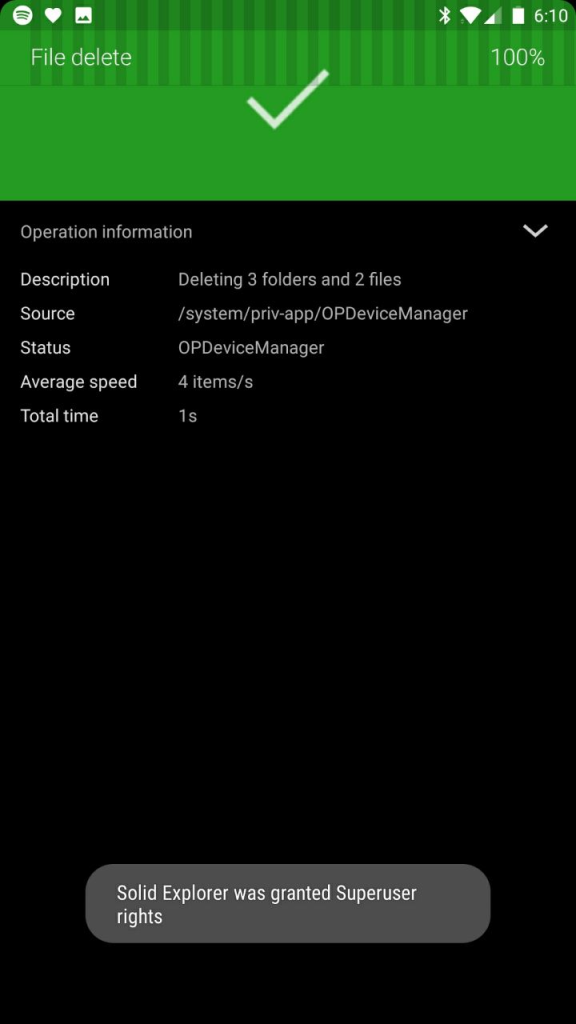
- And visit the following path to delete OPDeviceManager.apk from the path listed below.
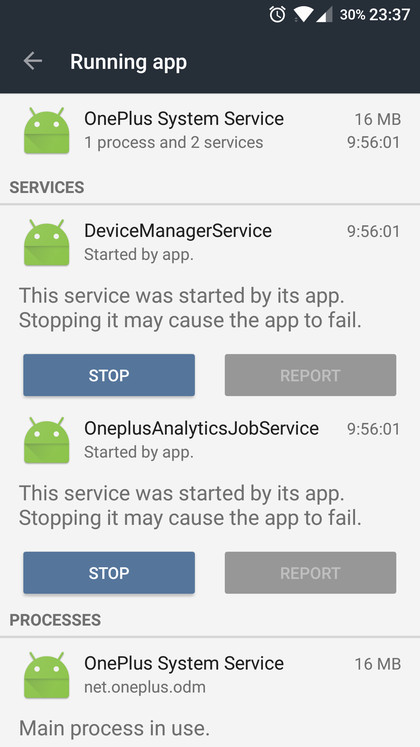
So you can either use the ADB shell method from above or simply delete the service using root explorer.
Note that the OPDeviceManager is part of Oxygen firmware. So be careful it does not affect other apps. Create a backup before you proceed.