
Close Menu

    Subscribe to Updates

    Get the latest creative news from FooBar about art, design and business.

    What's Hot

    VidMate vs Top Downloaders: 10 Reasons It’s the Ultimate Winner

    April 29, 2026

    Ai ghi nhiều hat-trick nhất lịch sử bóng đá? 

    April 29, 2026

    Bảng xếp hạng bóng đá La Liga mới nhất hôm nay

    April 29, 2026
    Facebook X (Twitter) Instagram
    WhatsApp
    Techy Hit Tools
    • Home
    • Tools
    • Write For Us
    Contact US
    Techy Hit Tools
    Home»HOW TO»How to block annoying celebrity news and posts from your news feeds? Block Kardashians, Bieber, and more
    HOW TO

    How to block annoying celebrity news and posts from your news feeds? Block Kardashians, Bieber, and more

    ManojBy ManojJuly 10, 2024No Comments3 Mins Read
    Facebook Twitter Pinterest LinkedIn Tumblr Email
    celebrity news
    Share
    Facebook Twitter LinkedIn Pinterest Email

    Finding quality news could get difficult amid all the nonsensical celebrity news and posts that prevail across the internet as click baits. These annoying posts can be presented to you while browsing through your daily news feeds in the morning, or while going through your social accounts like Facebook or Twitter. It is almost impossible getting away without coming across some annoying celebrity gossips or some publicity stunts by the celebs like the Kardashians, Bieber, Kanye and much more. Meanwhile, some wise developer came up with the wise idea of Kardblock that would block all the news and posts about the Kardashians. However, with time the plugins got updated and there are several improvements to the extension and its code helps block all the posts about any celebrity you add into its filter.

    There are probably thousands and millions of posts about the Kardashians rendering across the internet and they are continuously posted about every day. Moreover, even your favorite editorials come up with the celebrity news because they simply get more views and clicks. Some writer in some part of the world is probably be writing about a celebrity that most annoys you. However, there is a way you can block all this and get quality news posts and much more and be productive.

    How exactly can you block celebrity news from your daily activity? How to spend a day without hearing about the Kardashians or Justin Bieber? How to ready only quality news and remove all the posts about the celebs? This post may answer all of this and help you block, not all, but most of the posts and news that you don’t need. All you need is a Chrome or any other browser extension (add-on).

    Unfortunately, there is no such Android app that will do the same on your smartphone. As the chrome extensions and plugins are only limited to desktops and PCs, you may not be able to enjoy it on your smartphone. However, we are looking forward to similar thing on your Android.

    List of chrome extensions to block celebrity news:

    • Kardashian Filter
    • Silence of the Celebs
    • KardBlock (for firefox browser)

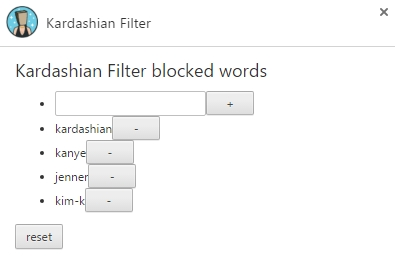
    How to use Kardashian Filter browser extension to block celebs from your news feed?

    • Install one of the plugins listed above and it will do the rest
    • By default, it blocks Kardashians and other posts
    • It will also remove related posts fields, hide social media posts on FB, Twitter, etc.
    • Once activated, the plugins will block or remove all the text and images from the post.
    Here is an example of the before and after results using the Kardashian Filter on one of the sites about celebrity news. This is just an example of the related post section. There’s more to try for yourself.

    Before:

    After:

    Share. Facebook Twitter Pinterest LinkedIn Tumblr Email
    Manoj
    Manoj
    • Website

    Manoj, a tech enthusiast behind Techy Hit Tools, offers a comprehensive resource hub for tech aficionados. Dive into insightful guides, reviews, tutorials, and vibrant community support, ensuring you stay at the forefront of technology trends.

    Related Posts

    How To Set Microsoft Teams Status As Always Available

    September 24, 2024

    How Can You Screenshot OnlyFans Pictures

    September 24, 2024

    Can You See Text Messages on AT&T

    September 10, 2024
    Leave A Reply Cancel Reply

    Live Results Search
    Our Picks

    VidMate vs Top Downloaders: 10 Reasons It’s the Ultimate Winner

    April 29, 2026

    Ai ghi nhiều hat-trick nhất lịch sử bóng đá? 

    April 29, 2026

    Bảng xếp hạng bóng đá La Liga mới nhất hôm nay

    April 29, 2026

    World Cup 2026 có bao nhiêu trận đấu? Toàn cảnh thể thức mới và số trận chính xác nhất

    April 28, 2026

    Subscribe to Updates

    Get the latest creative news from SmartMag about art & design.

    About Us

    techy hit tools is a versatile platform that offers a comprehensive suite of over 30 free online tools designed to aid webmasters, students, teachers, and SEO experts.

    From content analysis to Backlink Maker, plagiarism checking to grammar correction, techy hit tools empowers users with a wide array of tools to enhance their online endeavors.

    Facebook Instagram Pinterest LinkedIn WhatsApp
    Our Picks

    VidMate vs Top Downloaders: 10 Reasons It’s the Ultimate Winner

    April 29, 2026

    Ai ghi nhiều hat-trick nhất lịch sử bóng đá? 

    April 29, 2026

    Bảng xếp hạng bóng đá La Liga mới nhất hôm nay

    April 29, 2026
    Contact US

      • Phone: +44 7950904740

      • Email: [email protected]

    HelpFull Links

    Here are some helpfull links for our user. hopefully you liked it.


            • สล็อต
            • สล็อต
            • สล็อตเว็บตรง
            • UFABET
            • สล็อต
            • เว็บสล็อต
            • เว็บสล็อต
            • สล็อตเว็บตรง
            • สล็อต
            • エクスネス ログイン
            • 123FAZ
            • สล็อต
            • UFABET เข้าสู่ระบบ
          • แทงบอล


    Copyright © 2026 Techy Hit Tools.
    • Home
    • About Us
    • Contact Us
    • Privacy Policy
    • Disclaimer
    • Terms of Use
    • Write For Us

    Type above and press Enter to search. Press Esc to cancel.

    WhatsApp us