Close Menu

    Subscribe to Updates

    Get the latest creative news from FooBar about art, design and business.

    What's Hot

    Evaluating the Resilience of Your Encryption Stacks Against Advanced Qubit-Based Attacks

    April 13, 2026

    Evaluating the Resilience of Your Encryption Stacks Against Advanced Qubit-Based Attacks

    April 13, 2026

    How to Register and Login on Asia128 Safely: Step-by-Step Guide

    April 11, 2026
    Facebook X (Twitter) Instagram
    WhatsApp
    Techy Hit Tools
    • Home
    • Tools
    • Write For Us
    Contact US
    Techy Hit Tools
    Home»blog»How To Set Timer Resolution?
    blog

    How To Set Timer Resolution?

    ManojBy ManojFebruary 13, 2024Updated:March 9, 2024No Comments3 Mins Read
    Facebook Twitter Pinterest LinkedIn Tumblr Email
    How To Set Timer Resolution?
    How To Set Timer Resolution?
    Share
    Facebook Twitter LinkedIn Pinterest Email

    In the realm of computer systems, timer resolution plays a crucial role in determining overall performance. Essentially, timer resolution refers to the granularity or accuracy of time measurements made by the operating system. It influences various aspects of system behavior, including task scheduling, multimedia playback, and overall responsiveness.

    Importance of Optimizing Timer Resolution

    Optimizing timer resolution can lead to significant improvements in system performance and user experience. By adjusting timer settings, users can minimize input latency, reduce jitters in multimedia playback, and ensure smoother execution of real-time tasks. However, improper configuration or neglecting timer resolution optimization may result in sluggish performance, increased power consumption, and degraded user satisfaction.

    How to Set Timer Resolution on Windows Systems

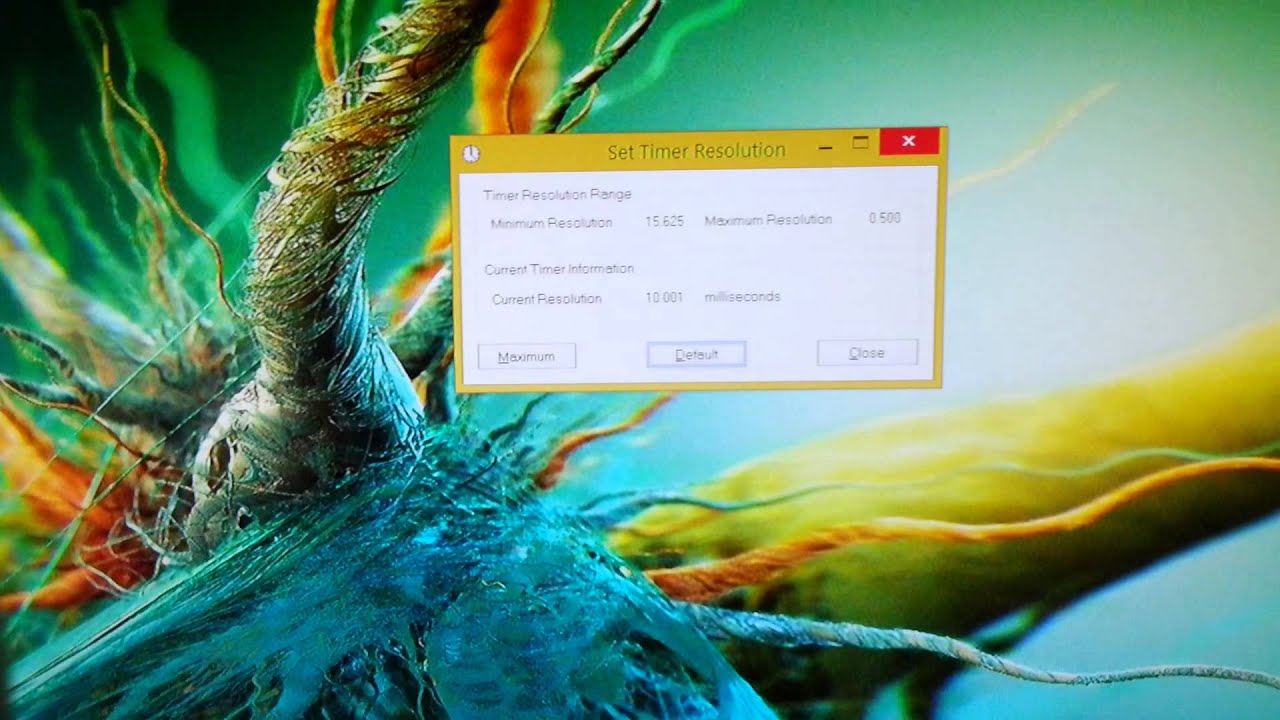
    For Windows users, adjusting timer resolution involves accessing system settings through the Command Prompt or third-party utilities. Here’s a step-by-step guide to setting timer resolution for optimal performanceIn the Command Prompt window, type “powercfg /energy” and press Enter.Wait for the energy efficiency report to generate.Look for the “Platform Timer Resolution” section to view the current timer resolution settings.

    Adjust Timer Resolution

    To set a custom timer resolution, download and install the “TimerTool” utility from a trusted source.Launch TimerTool and choose your desired timer resolution (e.g., 0.5 ms, 1 ms, etc.).Click on “Apply” to update the timer resolution settings.

    Verify Changes

    Return to Command Prompt and re-run the “powercfg /energy” command to confirm the updated timer resolution.Ensure that the Time Resolution changes are reflected in the “Platform Timer Resolution” section.

    Best Practices for Timer Resolution Optimization

    To maximize the benefits of timer resolution optimization, consider the following best practices:Regular Monitoring: Periodically check timer resolution settings to ensure they align with performance requirements.

    Avoid Extreme Values: 

    While lower timer resolutions can enhance responsiveness, excessively high resolutions may strain system resources unnecessarily.Test and Iterate: Experiment with different timer resolutions to find the optimal balance between performance and stability for your specific workload.

    Utilize Power Plans: 

    Windows offers power plans that may affect timer resolution settings. Choose a power plan that prioritizes performance when necessary.Be Cautious with Third-Party Tools: When using third-party utilities for timer resolution adjustment, ensure they come from reputable sources to avoid potential security risks.

    Conclusion:

    Optimizing timer resolution is a valuable strategy for enhancing system performance and responsiveness. By understanding its importance and following the recommended steps, users can fine-tune their systems for optimal results. Remember to monitor changes and adjust settings as needed to maintain an ideal balance between performance and stability. With the right approach, mastering timer resolution can lead to a smoother computing experience and increased productivity.

    Share. Facebook Twitter Pinterest LinkedIn Tumblr Email
    Manoj
    Manoj
    • Website

    Manoj, a tech enthusiast behind Techy Hit Tools, offers a comprehensive resource hub for tech aficionados. Dive into insightful guides, reviews, tutorials, and vibrant community support, ensuring you stay at the forefront of technology trends.

    Related Posts

    Evaluating the Resilience of Your Encryption Stacks Against Advanced Qubit-Based Attacks

    April 13, 2026

    Evaluating the Resilience of Your Encryption Stacks Against Advanced Qubit-Based Attacks

    April 13, 2026

    How to Register and Login on Asia128 Safely: Step-by-Step Guide

    April 11, 2026
    Leave A Reply Cancel Reply

    Live Results Search
    Our Picks

    Evaluating the Resilience of Your Encryption Stacks Against Advanced Qubit-Based Attacks

    April 13, 2026

    Evaluating the Resilience of Your Encryption Stacks Against Advanced Qubit-Based Attacks

    April 13, 2026

    How to Register and Login on Asia128 Safely: Step-by-Step Guide

    April 11, 2026

    MM88 – Popular Sportsbook With Competitive Betting Odds

    April 11, 2026

    Subscribe to Updates

    Get the latest creative news from SmartMag about art & design.

    About Us

    techy hit tools is a versatile platform that offers a comprehensive suite of over 30 free online tools designed to aid webmasters, students, teachers, and SEO experts.

    From content analysis to Backlink Maker, plagiarism checking to grammar correction, techy hit tools empowers users with a wide array of tools to enhance their online endeavors.

    Facebook Instagram Pinterest LinkedIn WhatsApp
    Our Picks

    Evaluating the Resilience of Your Encryption Stacks Against Advanced Qubit-Based Attacks

    April 13, 2026

    Evaluating the Resilience of Your Encryption Stacks Against Advanced Qubit-Based Attacks

    April 13, 2026

    How to Register and Login on Asia128 Safely: Step-by-Step Guide

    April 11, 2026
    Contact US

      • Phone: +44 7950904740

      • Email: [email protected]

    HelpFull Links

    Here are some helpfull links for our user. hopefully you liked it.


            • สล็อต
            • สล็อต
            • สล็อตเว็บตรง
            • UFABET
            • สล็อต
            • เว็บสล็อต
            • เว็บสล็อต
            • สล็อตเว็บตรง
            • สล็อต
            • エクスネス ログイン
            • 123FAZ
            • สล็อต
            • UFABET เข้าสู่ระบบ
          • แทงบอล


    Copyright © 2026 Techy Hit Tools.
    • Home
    • About Us
    • Contact Us
    • Privacy Policy
    • Disclaimer
    • Terms of Use
    • Write For Us

    Type above and press Enter to search. Press Esc to cancel.

    WhatsApp us