
ADB stands for Android Debug Bridge which is quite an effective tool if you own an Android device. While its main purpose is for Android development, ADB can be used for day to day activity for advanced users meaning to install OTA updates manually, cast Android screen on PC, root Android, unlocking Bootloader, and much more. Here are easier ways to install or setup ADB and Fastboot onto Windows PC, Linux machine, or macOS.
ADB and Fastboot enables the user to send terminal commands to your phone from your computer via USB cable. Android Debug Bridge (ADB) consists of binaries that allow you to send a wide array of terminal commands to your phone at just about any time; Checkout List of useful ADB and Fastboot commmands for Android post.
Whereas, Fastboot enables you to send commands to the Bootloader of your Android device. Meaning, you can flash, modify, update your phone’s firmware. You can also install custom recoveries like latest TWRP recovery, stock firmware or factory images, or even custom ROMS like Lineage OS, Resurrection Remix, etc.
So ADB and Fastboot are invaluable tools that almost every Android user needs. Without them, flashing a kernel or system image would be much more difficult or even impossible. You can even do as simple tasks as installing an APK using ADB.
This tutorial will show you how to install or setup ADB and Fastboot on Mac OS, Linux, Chrome OS and Windows PC. In just a few simple steps you can get started with Android development.
How to setup ADB and Fastboot on Windows?
ADB and Fastboot environment for Windows 11, Windows 10, Windows 8, Windows 7, Windows XP, can be achieved using the quick ADB and Fastboot Installer listed below. There are multiple ways you can do so.
In order to setup ADB and Fastboot on Windows PC quickly, download the Tiny ADB or 15 seconds ADB Installer listed below to get ADB across the system. You can fire ADB commands from any location. It will also Add to System Path Environment.
You can also use Google’s very own ADB binary to quickly setup. However, using that you can only run ADB and Fastboot in that specific folder.
1. Setup Tiny ADB & Fastboot Tool for Windows
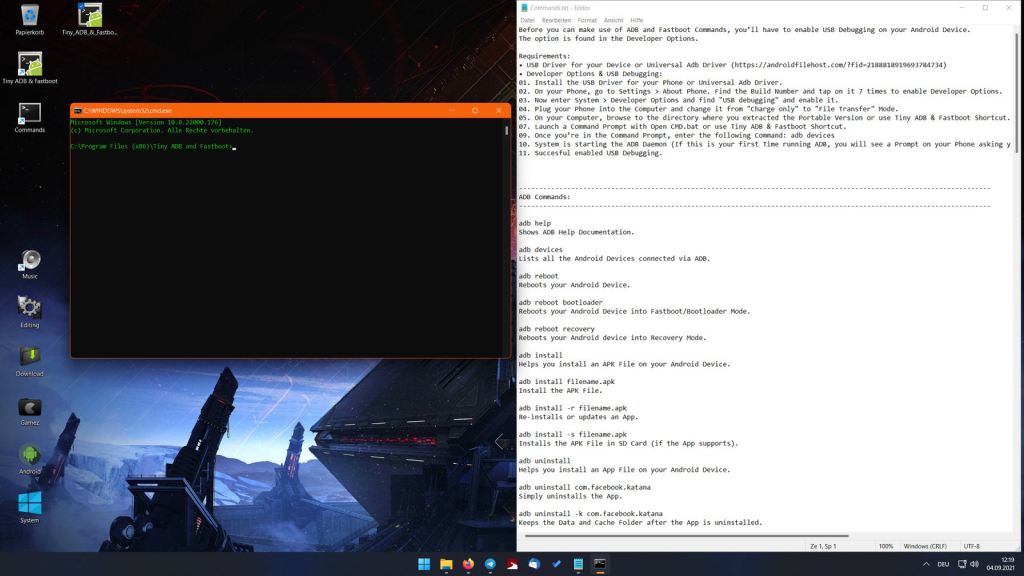
The Tiny ADB & Fastboot is a tool developed for Windows OS specifically and will install ADB across the system. So you can launch a command prompt or terminal anywhere on your device and start using ADB commands. It will setup Android Debug Bridge & Fastboot updated to latest v1.0.41 (Version 31.0.3-7562133, August 2021).
You get 3 installation options. One is an Installer where you can choose which options to install. Portable is a folder with ADB environment. Universal ADB driver will install ADB everywhere.
- Installer
- Portable
- Universal Adb Driver
Thanks to developer K3V1991 on XDA forums for developing the stunning tool.
2. Download 15 seconds ADB Installer for Windows:
The following 15 second ADB installer will setup ADB environment across the Windows operating system. If the v1.4.3 does not work, go for v1.3.
- Download ADB setup 1.4.3 | Mirror link
- Download ADB setup 1.3 | Mirror link
Setup ADB and Fastboot on Windows, Linux, and macOS using Google’s
Google officially released separate ADB and Fastboot Binaries publicly. So no more downloading complete SDK packages (over 2 GB in size) to just get ADB and Fastboot on your computer. Download small ADB and Fastboot packages, extract them, and start using ADB commands on Windows, Linux, or Mac OS.
Moreover, these are the latest binaries so ADB should work seamlessly with Android 11, 10, 9 Pie, Android 8.0 Oreo, Android 7.1/7.0 Nougat, or earlier versions.
Google has realized ADB and Fastboot Binaries forWindows, Linux, or Mac OS.
- ADB and Fastboot for Windows
- ADB and Fastboot for Mac
- ADB and Fastboot for Linux
USB Drivers for Android
- USB Driver for Android (automatic)
- Samsung official Android USB Driver (15.3 MB) (Manual)
ADB and Fastboot installation
01. Install the USB Driver for your Phone or Universal Adb Driver.
02. On your Phone, go to Settings > About Phone. Find the Build Number and tap on it 7 times to enable Developer Options.
03. Now enter System > Developer Options and find "USB debugging" and enable it.
04. Plug your Phone into the Computer and change it from "Charge only" to "File Transfer" Mode.
05. On your Computer, browse to the directory where you extracted the Portable Version or use Tiny ADB & Fastboot Shortcut.
07. Launch a Command Prompt with Open CMD.bat or use Tiny ADB & Fastboot Shortcut.
09. Once you’re in the Command Prompt, enter the following Command: adb devices
10. System is starting the ADB Daemon (If this is your first Time running ADB, you will see a Prompt on your Phone asking you to authorize a Connection with the Computer. Click OK.).
11. Succesful enabled USB Debugging.
Test the ADB connection by issuing the following command.
adb devices
It should output a string with device’s product code.
Alternative method to setup ADB and Fastboot on Mac OS and Linux
- First, download: Android4.zip file. This contains ADB and Fastboot files. Now place it on your desktop (or any location).
- Now extract (unzip) the android.zip file by double clicking it and you will get a folder named “android” that contains multiple files. Files for both Mac OS and Linux.
- You can simply run the ADB-Install-Linux.sh on Linux and ADB-Install-Mac.sh on Mac OS and the operation will automatically install it.
- If you want to manually input commands, then open a new Terminal window on your Mac or Linux system. For Mac, you can search for it from Spotlight with ⌘-Space or find it in your Applications > Utility folder. For Linux, just type terminal in search.
- In the terminal, type in the following command